Changelog v1.32 - April 24, 2026
Summary
This release delivers two headline changes: a unified tracking board that brings telemed and in-person visits into a single view, and a substantial overhaul of the immunizations module that introduces quick picks, multi-CPT administration support, and a consolidated history display.
Oystehr AI received updates that reduce charting steps and improve E&M code recommendation accuracy. The release also adds quick picks for both immunizations and in-house medications, introduces a human-friendly patient ID across the application, and delivers several RCM improvements including per-location fee schedules.
Tracking Board
- Telemed and in-person visits now appear together on a single tracking board. Previously, virtual visits had their own separate queue; providers and staff can now monitor and act on all visit types from one place. The tracking board gained a Visit Type filter that includes virtual visit options, and the telemed visit details screen received a Visit Status selector with additional status values. Controls specific to the former telemed queue were removed as part of this consolidation (#4569 (opens in a new tab), #6708 (opens in a new tab), #7040 (opens in a new tab), #7023 (opens in a new tab), #7027 (opens in a new tab)).
Clinical Documentation and Workflow
Oystehr AI
- Oystehr AI suggestions can now be moved directly into the progress note with a single click, reducing the steps needed to complete a chart after a visit (#6441 (opens in a new tab)).
- The E&M code produced by Oystehr AI's coding assistant was corrected to address a pattern where the suggested code was too low relative to the documented visit complexity (#7069 (opens in a new tab)).
Exam
-
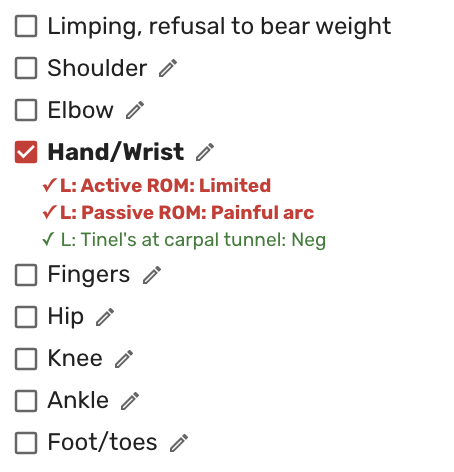
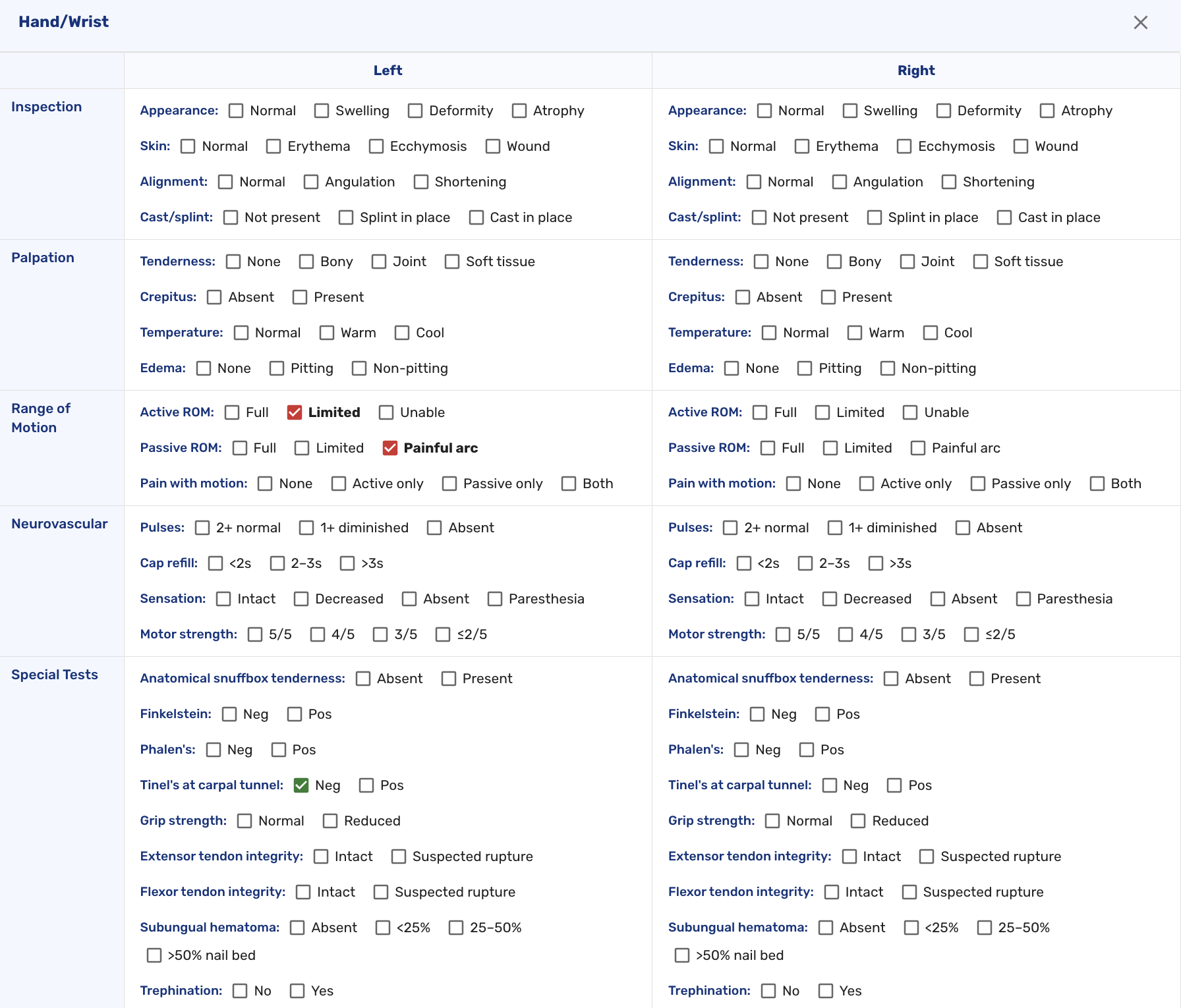
The general exam template was updated with new clinical sections and additional detail options, giving providers a broader range of choices when documenting findings.
E&M Codes
- Two additional E&M codes are now available in the E&M coding menu: 99211 (office or other outpatient visit for an established patient that may not require the presence of a healthcare professional) and 99455 (work-related or medical disability evaluation by the treating physician) (#6668 (opens in a new tab), #6402 (opens in a new tab)).
Procedures
- Providers can now enter a free-text procedure name if no existing match is found in the procedure list. Custom names can be saved to procedure quick picks for reuse in future visits (#6672 (opens in a new tab)).
Immunizations
- The immunizations module received a substantial overhaul. Immunization quick picks are now available: staff can save common vaccine configurations from the order page or the vaccine details card, then reapply them in future visits to pre-fill order and administration fields. Quick picks are managed in the Admin section and include a searchable filter. The administration form now supports multiple CPT/HCPCS codes per vaccine and adds an NDC field alongside the LOT number. CPT codes are automatically added to chart data when a vaccine is administered. Vaccine history and notes were consolidated into a single table at the bottom of the active orders list (#7190 (opens in a new tab), #7199 (opens in a new tab)).
In-House Medications
- Quick picks are now available for in-house medications. Administrators can configure and manage quick pick entries from the Admin section, and staff can apply them when creating medication orders to pre-fill common fields (#6597 (opens in a new tab)).
- The in-house medications module received additional workflow improvements and expanded administration options (#6563 (opens in a new tab)).
- Medications are now listed in alphabetical order in the Admin section (#6924 (opens in a new tab)).
- A success confirmation now appears when a medication record is updated in the Admin section (#6920 (opens in a new tab)).
In-House Lab Orders
- Glucose result fields now accept alphanumeric values, accommodating result strings such as "HI" or "LO" returned by certain analyzers (#6934 (opens in a new tab)).
Patient Record
- Patients now have a human-friendly ID displayed throughout the application, making it easier to reference and communicate about specific patient records (#3138 (opens in a new tab)).
- Patient weight is now shown in the top navigation bar during a visit, giving providers quick access to this value without navigating to the vitals section (#3220 (opens in a new tab)).
Visit Details
- Insurance fields on the visit details screen were updated for improved layout and accuracy (#6723 (opens in a new tab)).
- A list of common specialties was added to the Specialty Transfer tab in the Disposition section (#6587 (opens in a new tab)).
- The radiology consent now includes a hyperlink for direct access to the consent document (#6881 (opens in a new tab)).
- Procedure codes entered with a modifier are now correctly reflected in the Payment Considerations block (#6873 (opens in a new tab)).
RCM & Billing
- Fee schedules can now be configured per location, allowing organizations with multiple sites to set separate pricing for each location (#6970 (opens in a new tab)).
- Non-AMA CPT codes can now be entered in fee schedules and charge masters, supporting billing scenarios that use codes outside the standard AMA set (#6971 (opens in a new tab)).
- Occupational Medicine visits now support adding and editing employer information directly within the application (#6803 (opens in a new tab)).
- Invoicing defaults can now be configured through a self-service interface in the billing settings (#6774 (opens in a new tab)).
- Patient receipt PDFs now display biller information appropriate to the visit location (#6720 (opens in a new tab)).
Bug Fixes
- Fixed an issue where patient app video calls were failing with a "The call has ended" error when patients attempted to join a virtual visit (#7141 (opens in a new tab)).
- Fixed an issue where invoiceable patients were not appearing in the invoiceable patients report (#6705 (opens in a new tab)).
- Fixed an issue where the registration page was landing on a 404 error on initial load (#6827 (opens in a new tab)).
- Fixed an issue where the Work Note PDF title "Work note for" was not displaying the patient's name (#6972 (opens in a new tab)).
- Fixed an issue where in-house lab specimen collection was returning a 500 error to users (#6768 (opens in a new tab)).
- Numerous other bug fixes (OTR-292 (opens in a new tab), OTR-1891 (opens in a new tab), OTR-2008 (opens in a new tab), OTR-2109 (opens in a new tab), OTR-2127 (opens in a new tab), OTR-2130 (opens in a new tab), OTR-2141 (opens in a new tab), OTR-2171 (opens in a new tab), OTR-2172 (opens in a new tab), OTR-2181 (opens in a new tab), OTR-2194 (opens in a new tab), OTR-2229 (opens in a new tab), OTR-2237 (opens in a new tab), OTR-2239 (opens in a new tab), OTR-2265 (opens in a new tab), OTR-2283 (opens in a new tab), OTR-2288 (opens in a new tab), OTR-2319 (opens in a new tab)).