Changelog v1.35 - June 3, 2026
Summary
-
Follow-up visit charting received two significant additions: chart data can now be copied forward from the original visit, and school and work notes are now available in annotation follow-up charts.
-
Patient education materials can now be built in Admin, AI-drafted, edited by the practice, and surfaced to providers at the point of diagnosis.
-
A new automated patient outreach feature allows practices to configure scheduled post-encounter messages to patients, supporting both billing follow-up and practice growth.
-
Global templates received a substantial upgrade, allowing providers to preview content and choose exactly how to apply each section.
-
Two-level vital alerts give clinical staff clearer visual distinction between caution and critical readings.
-
The tracking board gained multi-location support, allowing staff at multi-site practices to monitor multiple locations from a single view.
Tracking Board
- The location filter on the tracking board now supports multi-select. Staff can choose any combination of locations and view all matching visits together. The location name is displayed in the visit row so each visit's site is clear at a glance. Scheduled and on-demand visit timing are also shown in the location column (#4964 (opens in a new tab)).
- The selected tracking board tab now more conveniently persists when staff navigate to a progress note or patient record and return. Previously the board always reset to the default tab (#3471 (opens in a new tab)).
- Visit component indicators now turn green when staff completes patient information fields in Visit Details, not only when patients complete paperwork. This includes demographics, insurance cards, photo ID, and the consent verification checkbox (#7235 (opens in a new tab)).
Vital Alerts
- Vital sign alerts now use two levels: caution and critical. Each vital sign threshold was updated to reflect clinically appropriate values for each level. Caution alerts flag readings that warrant attention; critical alerts flag readings that require immediate action.
Scheduled Follow-up Visits
-
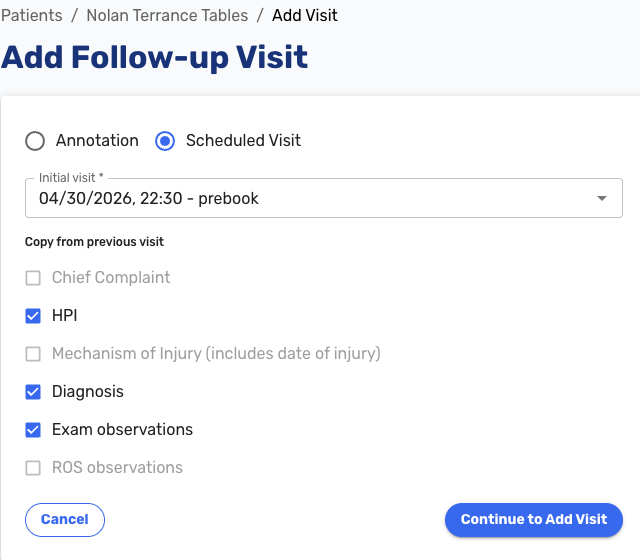
Providers can now copy chart data from the original visit into a follow-up note with a single click. When creating a follow-up note, a copy option presents the available sections from the original chart. Staff can select which fields to carry over, including chief complaint, HPI, MOI, diagnoses, and other documented findings (#7432 (opens in a new tab)).
-
School and work notes are now available in annotation follow-up charts. Previously, generating a new school or work note after a visit was signed required unlocking the original chart. Staff can now add or generate a school or work note directly from the follow-up without touching the original chart (#5465 (opens in a new tab)).
Automated Patient Outreach
-
Practices can now configure automated post-encounter outreach to patients. After a visit, the system can automatically send personalized messages via email and SMS and attempt credit card charges on a configurable schedule, reducing the manual follow-up burden on billing staff and keeping patients engaged after their visit.
Common uses include sending invoice reminders with payment links and requesting location specific Google reviews to help grow the practice's online presence. Reminder emails, SMS messages, credit card charge retries, and a final collection escalation step can each be individually toggled on or off with configurable intervals and retry limits.
Messages support placeholder variables including
{{location-review-link}}, which pulls the Google review link configured for the visit location in Admin (#4084 (opens in a new tab), #7465 (opens in a new tab)).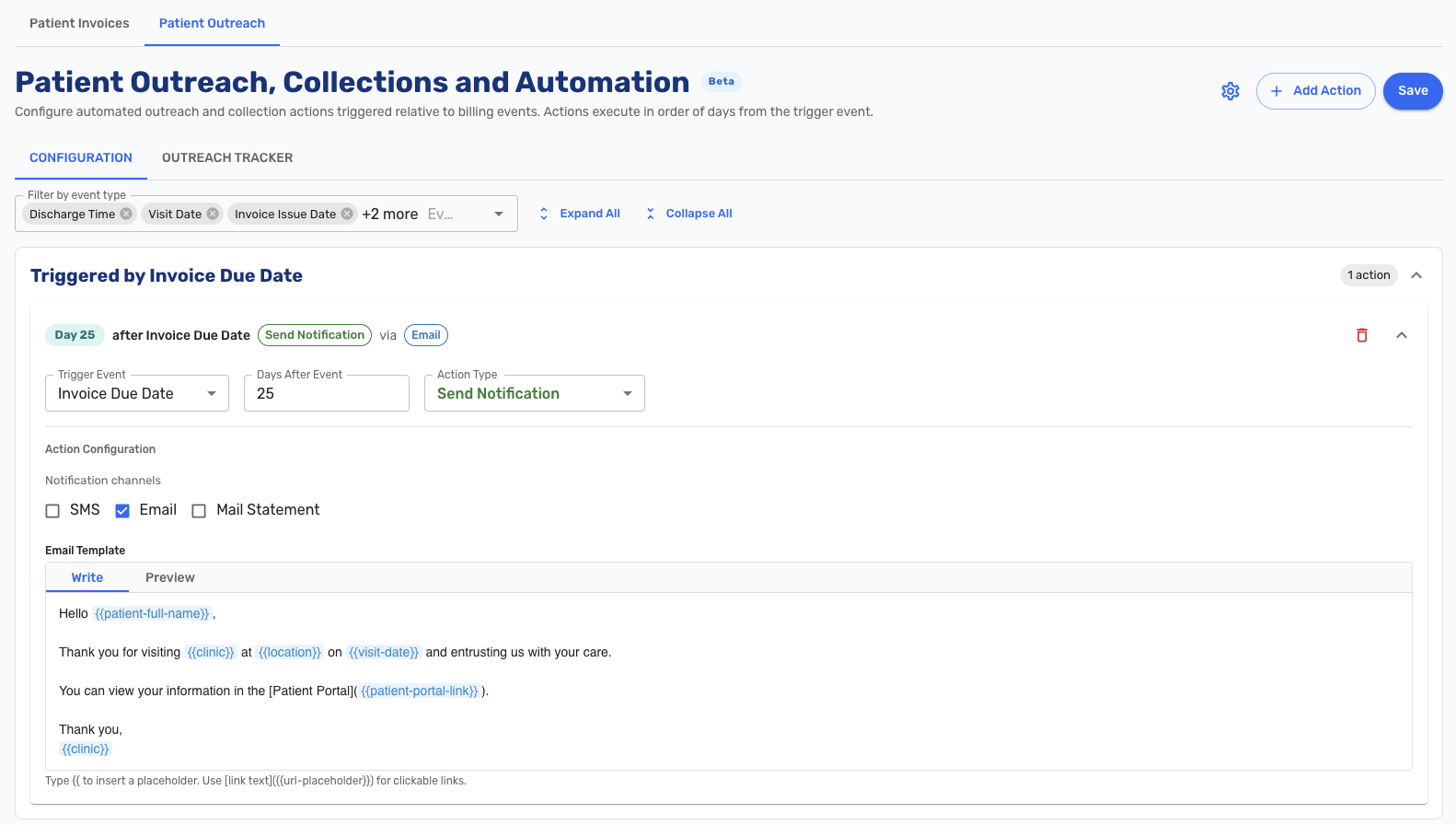
Patient Education Materials
-
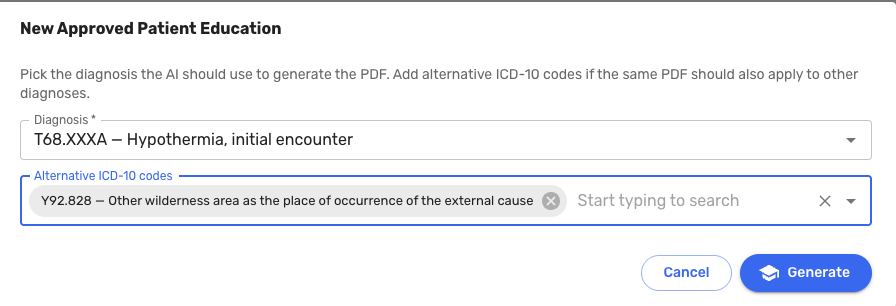
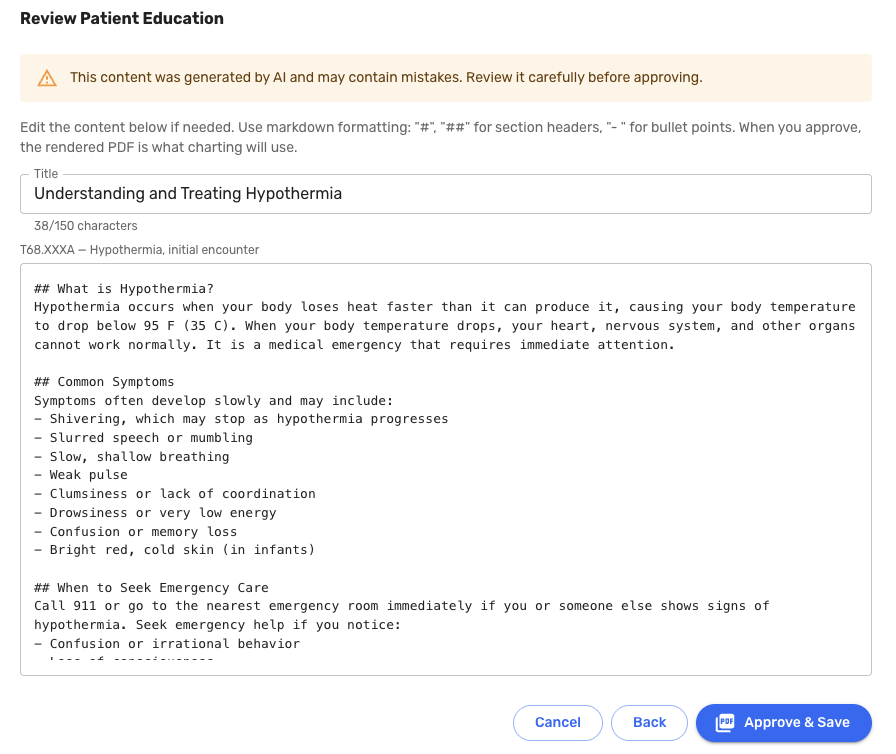
Practices can now build a library of patient education content in the Admin panel. For each diagnosis, an administrator selects the condition and optional ICD-10 codes, and Oystehr AI generates an initial draft of patient-friendly education content. The practice can review and edit the content before saving it for use by providers to give to patients.
When a provider later diagnoses a patient with a matching condition, a button appears in the Assessment section allowing the provider to view and print the education materials for that patient. Selected materials are also included in the discharge summary sent to the patient portal (#7052 (opens in a new tab)).
Global Templates
-
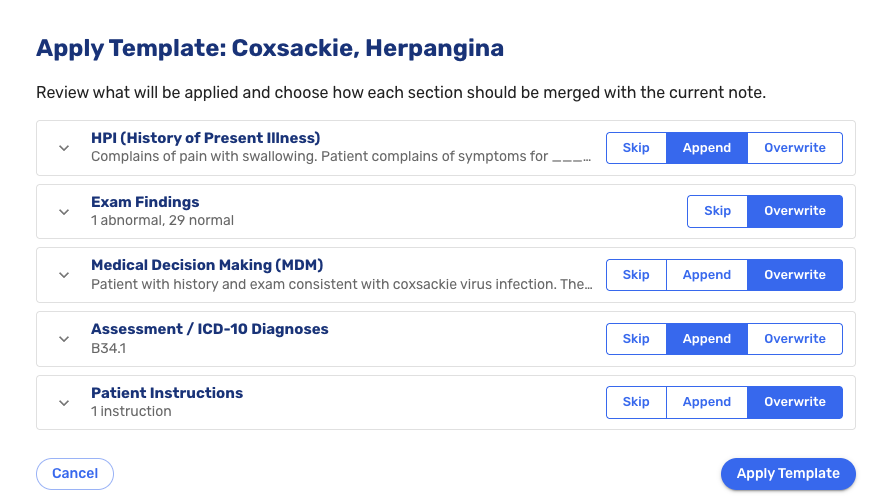
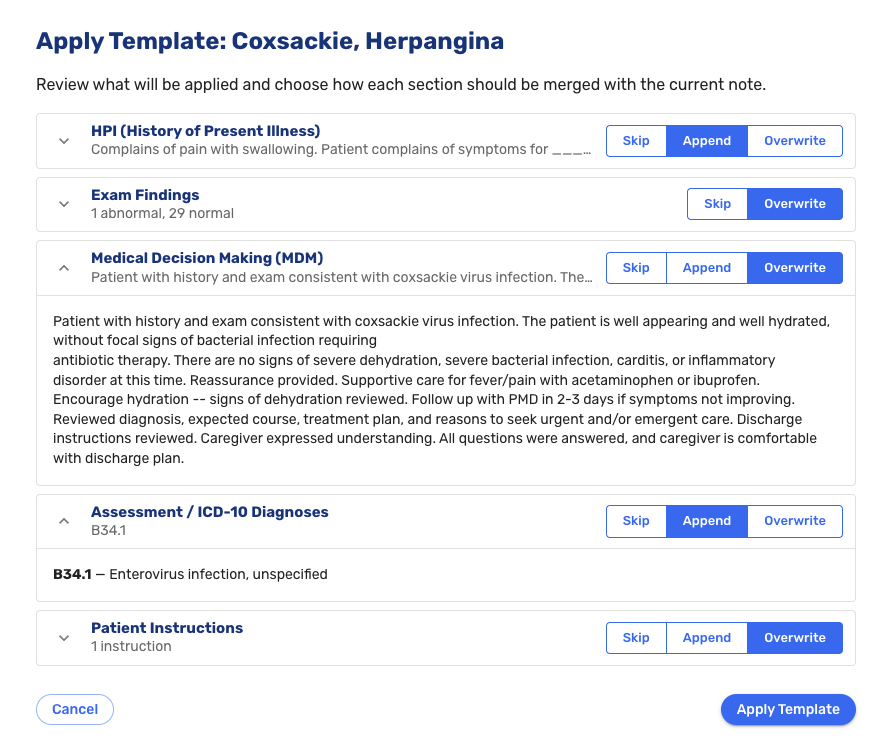
When applying a global template, providers can now preview its content before committing and choose which sections to apply and how, with options to append to existing content or replace it. This prevents templates from overwriting charted data unintentionally (#7563 (opens in a new tab)).
Command Palette
- The command palette can now be opened by clicking a visible search field on the tracking board and progress note, making it discoverable for users who prefer not to use the keyboard shortcut (#7440 (opens in a new tab)).
- Several command palette features that were lost during a reimplementation were restored, including patient search from the patients page, search bar shortcut behavior, and others (#7457 (opens in a new tab)).
Clinical Documentation
- The Exam tab is now unified across telemed and in-person visits. Both visit types use the same exam component, with the same sections and behavior (#7671 (opens in a new tab)).
- Multiple addendums can now be added to a progress note. Each addendum is timestamped with the author's name and the date and time it was added. Providers can delete their own addendums (#3170 (opens in a new tab)).
- The progress note top navigation bar loads noticeably faster (#7615 (opens in a new tab)).
School and Work Notes
-
Work and school excuse notes now include a "May Return to Work" and "May Return to School" date field, respectively. Both fields are optional and use a calendar picker.
This addresses a common point of confusion: notes that excuse a patient from work for a period are sometimes interpreted by employers as a restriction preventing earlier return. The new date field allows providers to explicitly state the earliest date a patient may return if they choose to, making the distinction between an excused absence and a binding restriction clear on the document itself (#7428 (opens in a new tab)).
In-House Medications
- Selecting a medication from the dropdown no longer automatically adds an associated CPT code to the order. CPT codes should now be applied through in-house medication quick picks, consistent with how other order types handle code assignment across the EHR (#7458 (opens in a new tab)).
- An anatomical location field was added back to the in-house medication administration screen, allowing staff to record where on the body the medication was administered. The field is optional and is supported by in-house medication quick picks (#6728 (opens in a new tab)).
Administration
-
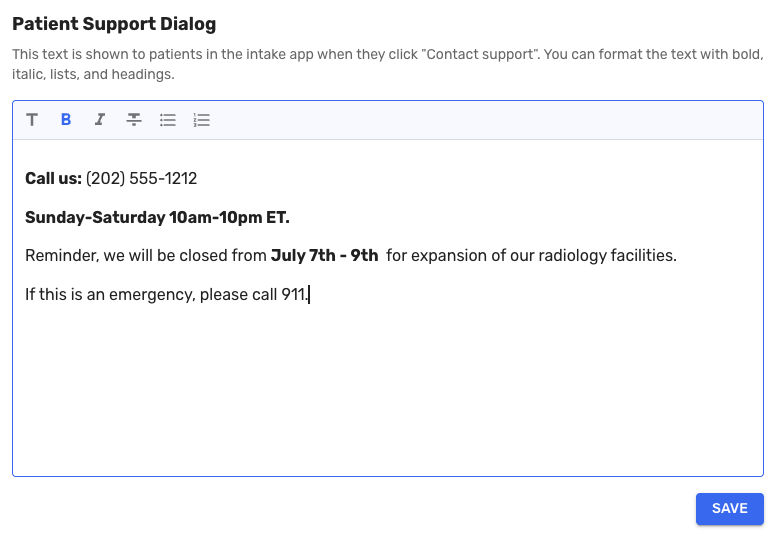
Administrators can now configure the text displayed in the patient portal's Contact Support dialog directly from Admin, without requiring a deployment (#6968 (opens in a new tab)).
-
Reports moved from within the Admin tab to its own top-level navigation tab. Admin-only reports remain restricted to users with the admin role (#7665 (opens in a new tab)).
-
Procedure quick picks are now sorted alphabetically and display a loading indicator while the list is being retrieved (#7393 (opens in a new tab)).
-
The Intake staff dropdown on the chart is now optional. Practices that do not use intake staff assignment can proceed without selecting a value (#7372 (opens in a new tab)).
-
The Upload New Document button in the patient documents section is now always enabled. Clicking it when no folder is selected shows a message directing staff to choose a folder first (#1885 (opens in a new tab)).
-
A success confirmation toast now appears after a patient merge is completed (#7434 (opens in a new tab)).
RCM & Billing
- Duplicate diagnosis codes are no longer sent to the RCM system. When the same code appears more than once in a visit's assessment, only a single instance is submitted (#7419 (opens in a new tab)).
Insurance Quick Picks
- Administrators can now configure insurance carrier quick picks in the Admin panel. Staff can apply them during patient registration to select the carrier quickly and accurately, without typing or searching (#7166 (opens in a new tab)).
Bug Fixes
- Fixed an issue where the outstanding balance block was not appearing on the Visit Details page after a claim balance was updated in the RCM system (#7184 (opens in a new tab)).
- Fixed an issue where fee schedule-based payment estimates were broken following the migration to the universal payer list (#7749 (opens in a new tab)).
- Fixed an issue where invoiceable patients were not appearing in the invoiceable patients report (#7381 (opens in a new tab)).
- Numerous other bug fixes (#2811 (opens in a new tab), #5169 (opens in a new tab), #5989 (opens in a new tab), #6930 (opens in a new tab), #7266 (opens in a new tab), #7268 (opens in a new tab), #7486 (opens in a new tab), #7571 (opens in a new tab), #7624 (opens in a new tab), #7709 (opens in a new tab), #7721 (opens in a new tab), #7722 (opens in a new tab), #7741 (opens in a new tab), #7750 (opens in a new tab), #7764 (opens in a new tab), #7846 (opens in a new tab), #7853 (opens in a new tab)).