Changelog v1.42 - September 9, 2026
Summary
- Staff with the Billing Admin role can now issue a refund or void a payment directly from the patient record, with a required reason recorded on every transaction.
- Notes can now be saved at the patient level and persist across every encounter, separate from the existing encounter-scoped notes.
- The Review & Sign page can now be edited in place with single page charting, so providers can correct a section without navigating away from the note.
- Ottehr AI can now be configured to check a progress note against practice-specific requirements at signing and warn the provider when something is missing.
- In-house lab results now appear directly in the orders list, so clinicians can see findings for every test on one screen instead of opening each test individually.
- The patient's room number now appears at the top of the chart, and the patient's name and room appear in the browser tab title for easy reference when multiple tabs are open.
Refunds and Voided Payments
-
Staff with the Billing Admin role can now issue a refund or void a payment from the patient record. Clicking on a payment in the patient's payment history opens a modal with two options, "Refund" and "Void." Void deletes the entire transaction and is not available for credit card payments. Refund lets staff enter an amount, which can be the full payment or partial. For a credit card payment, a matching refund is sent to the payment processor (#3734 (opens in a new tab)).
Both options require a reason. Staff choose from a preset list ("Entered in error or incorrect charge", "Service not provided", "Duplicate charge", "Overcharged") or select Other and enter free text. The staff member who issued the refund or void is recorded and visible on the transaction.
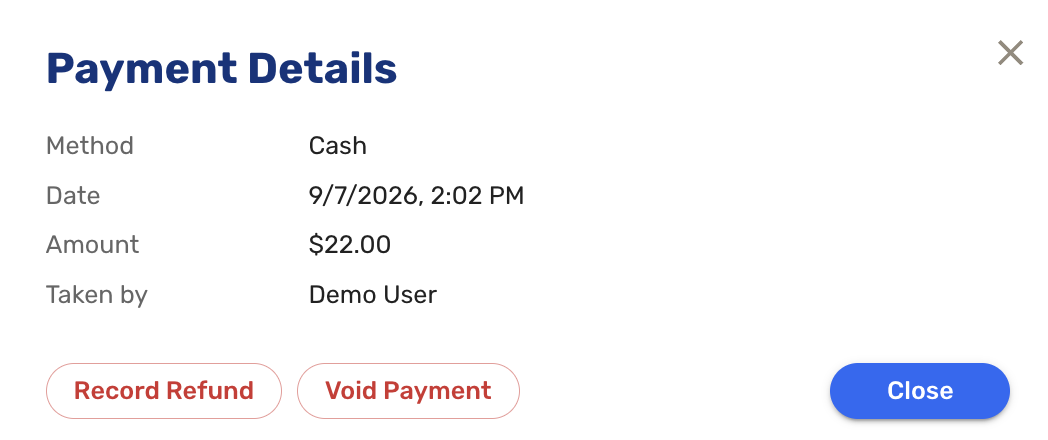
Payment Details 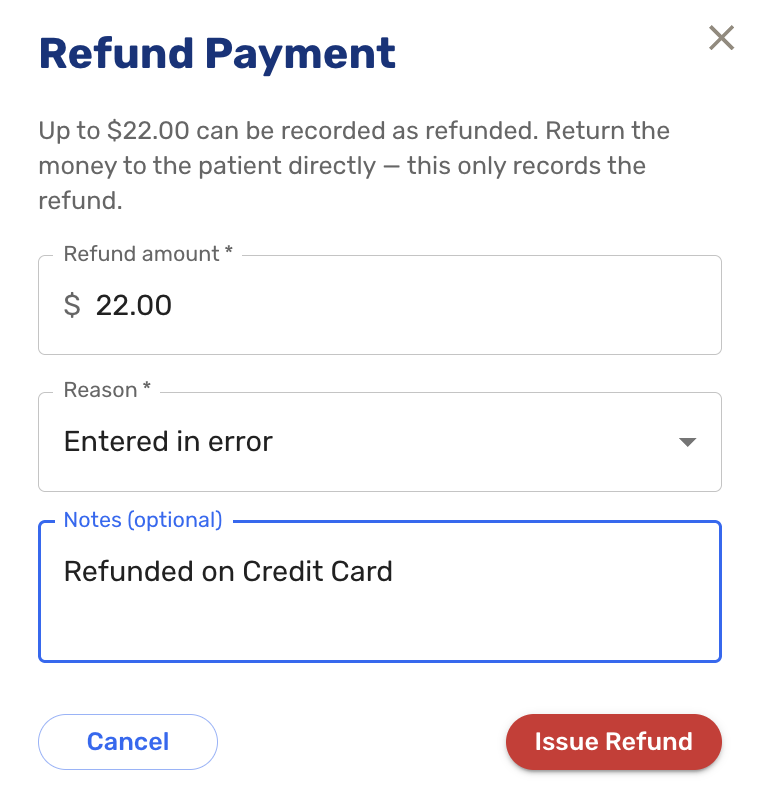
Making a refund 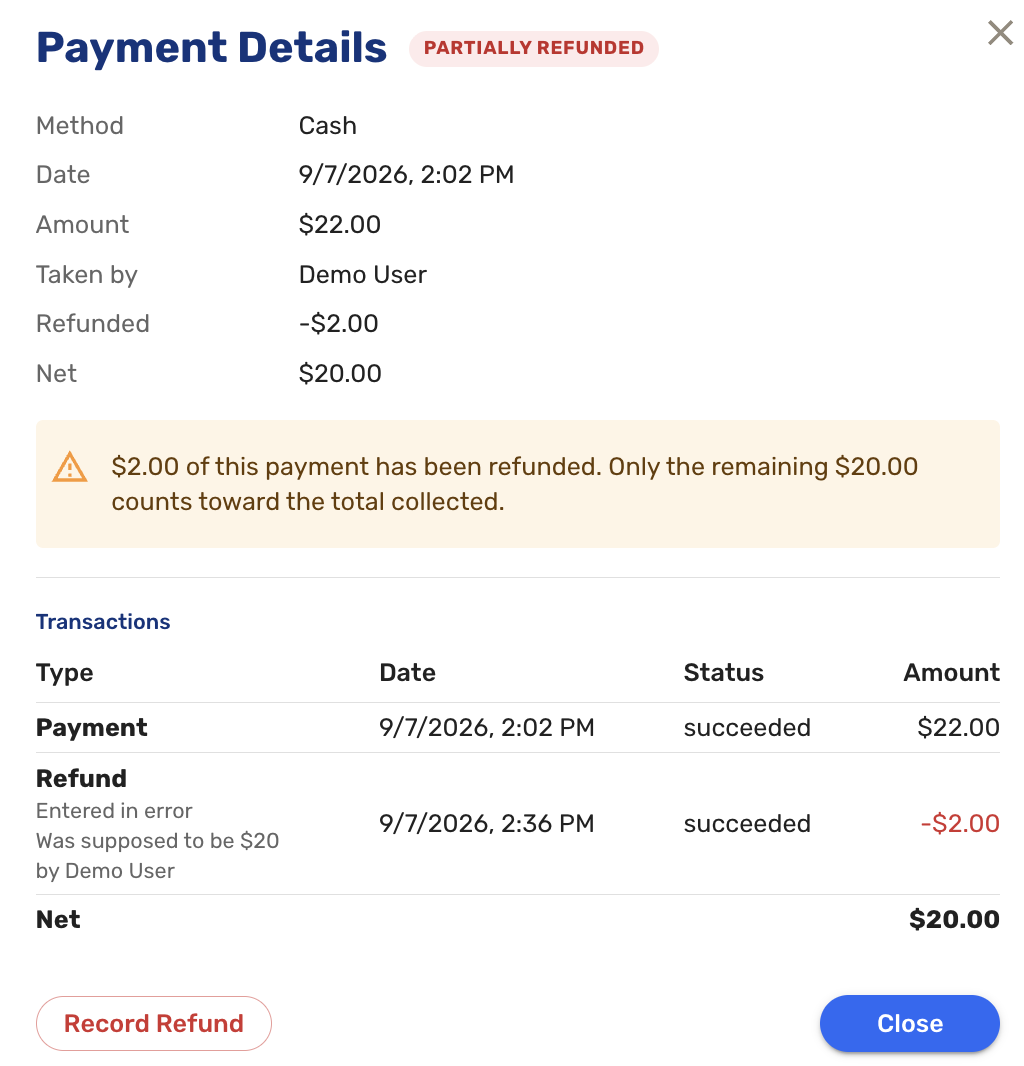
Payment Details after refund
Patient Notes
-
Notes can now be saved against a patient rather than a single encounter. Until now there were internal notes and tracking board notes, but both were scoped to one visit, so there was no way to record something that should follow the patient across every encounter (#8947 (opens in a new tab)).
A notes icon with a counter appears next to the patient name on visit history, visit details, the patient profile, and progress note pages. Clicking it opens a panel titled "Patient's Notes". Each note records its author and timestamp and is not visible to the patient.

Any user can edit or delete any note, including notes written by someone else. An edited note is marked as edited and shows its updated timestamp. The text box expands as it is typed into, and Shift+Enter now starts a new line in notes fields.
Single Page Charting
- The Review & Sign page can now be edited in place. Clicking Edit on a section heading opens that part of the chart directly within the page, and clicking Done closes it again. Providers no longer have to leave Review & Sign, navigate to the relevant tab, make a correction, and navigate back (#9501 (opens in a new tab)).
Configurable Note Review Prompts
-
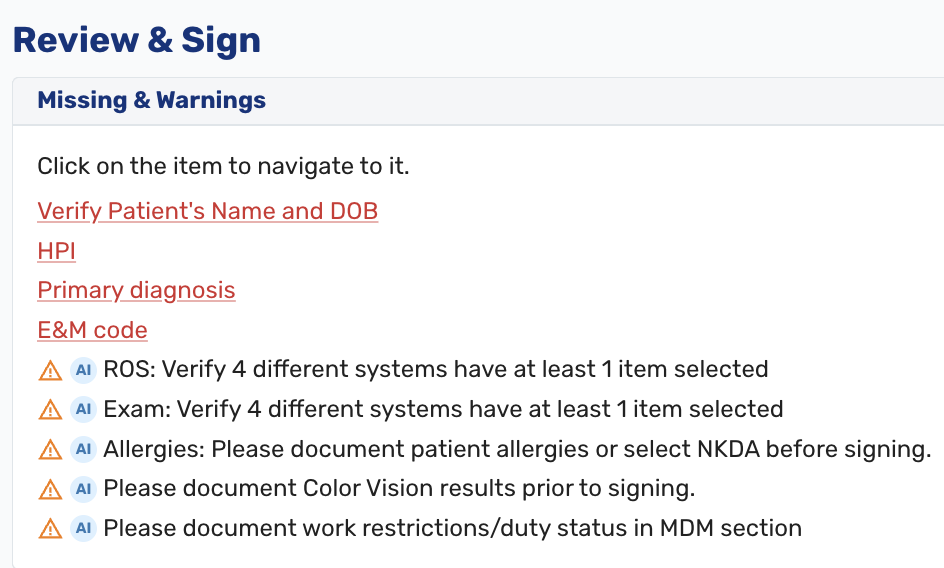
Ottehr AI can now evaluate a progress note against criteria a practice has defined as AI prompts and alert the provider at signing when the note does not meet them. Each Ottehr installation can have its own set of prompts configured (#8749 (opens in a new tab)).
A prompt might check that ROS and Exam have sufficient documentation, that color vision results are recorded on a DOT physical, or that work restrictions appear in the MDM section on a workers' compensation visit. Prompts are configured on request rather than through a self-service screen.
The alert is informational only. It appears once at signing and does not block the provider from signing the note.
In-House Lab Results in the Orders List
-
A Results column was added to the in-house labs table, so clinicians can see findings for every order without opening each test. Binary and qualitative results (Detected / Not Detected, Positive / Negative) display directly in the column. Single-value results show the value alongside its reference range. Multi-component tests such as urinalysis show how many components are abnormal, with one more click to see the detail. Abnormal values are shown in red and bold (#8980 (opens in a new tab)).
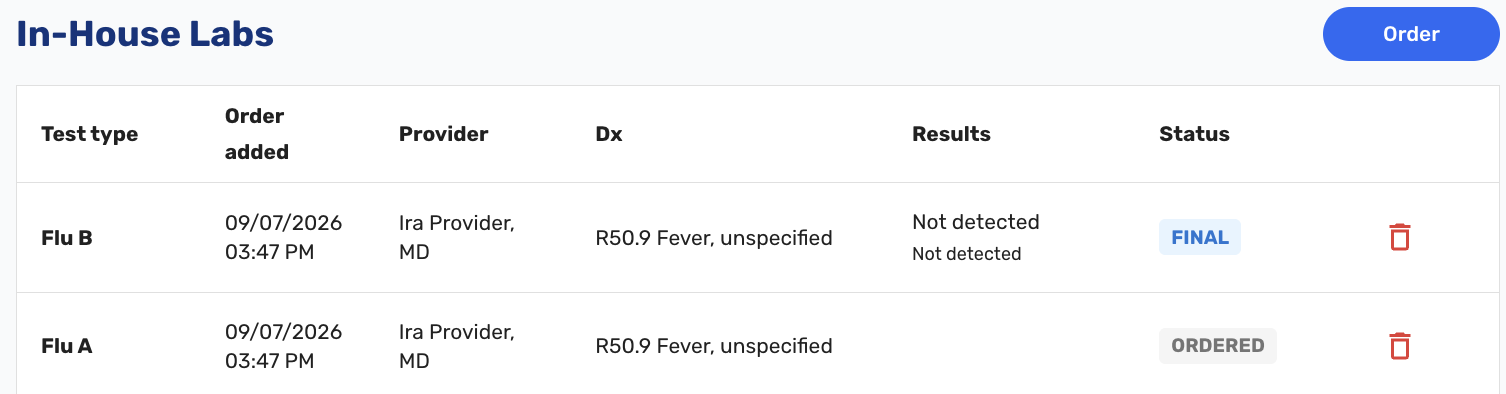
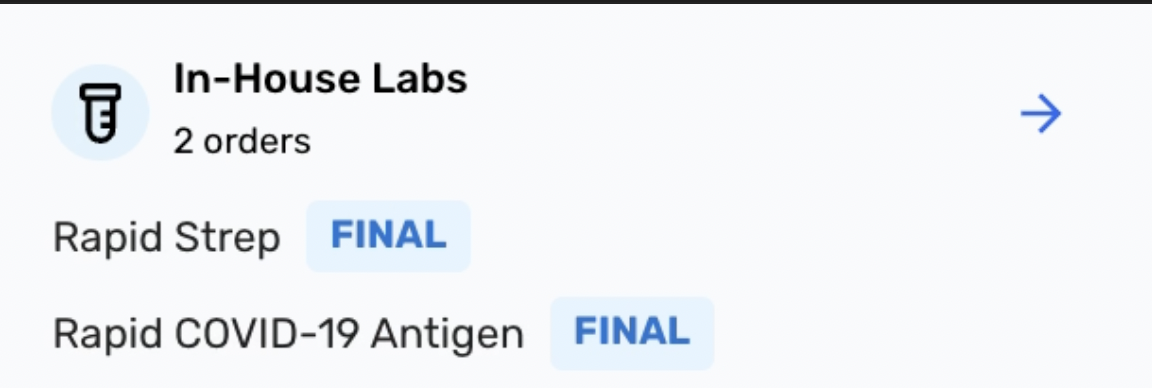
Getting there is also faster. The In-House Labs header in the tracking board orders pop-up is now clickable and goes straight to the list, and the pop-up itself shows the same results table. Drilling into an individual test from either place still works as before.
Card on File Removal
-
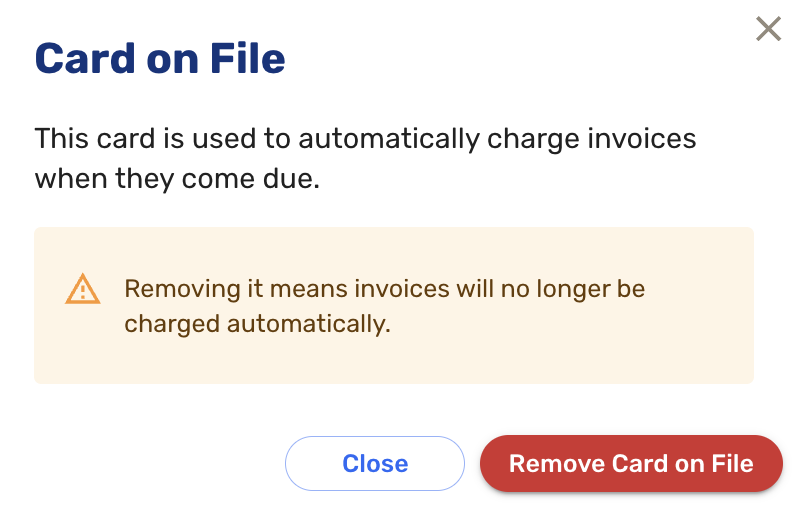
Staff with the Billing Admin role can now remove a card after it has been captured, from the Payer/Responsible for Claim section on Visit Details. A removed card no longer appears on the patient's credit card screen in the patient app on subsequent visits. To remove a card, click the green credit card icon to reveal the modal (#8853 (opens in a new tab)).
Room Number and Tab Title
- The patient's room number now appears in the top navigation bar on the chart. If a room number was entered on the tracking board, it carries through automatically, so providers can see which room a patient is in without leaving the note (#7877 (opens in a new tab)).
- The room number and patient name were also added to the browser tab title, shown as "Patient Name (Room Name)." Staff working with several patients open in different tabs can now tell them apart without clicking through each one (#9042 (opens in a new tab)).
Payment Display in the Chart
- Payment information moved to the third row of the chart top navigation bar and now shows how the visit is being paid for, not just the insurance name. The row reads as the insurance name followed by its fee schedule type: "Case Rate", "Fee for Service", "No Fee Schedule", "Occ-med", or "Pre-op". Self-pay visits show as "Self-Pay". This will assist Billers in reviewing claims (#7275 (opens in a new tab)).
Screening Questions
-
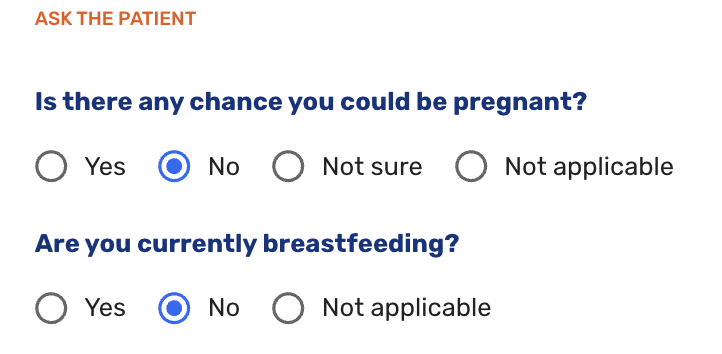
Two questions were added to the screening questions screen: "Is there any chance you could be pregnant?" with options for yes, no, not sure, and not applicable, and "Are you currently breastfeeding?" with options for yes, no, and not applicable (#8664 (opens in a new tab)).
School and Work Notes
- School and work notes are now signed by the provider assigned to the visit rather than by whichever user generated the note. Previously a staff member generating a note on a provider's behalf had their own name appear as the signature (#9017 (opens in a new tab)).
- The clinic address was also added to the upper left of school and work notes, next to the logo. Previously only the phone number appeared (#9187 (opens in a new tab)).
Visit Details
- On workers' compensation visits, the Workers Comp section now appears above the medical insurance section, matching the order staff actually work through (#8785 (opens in a new tab)).
- "Employee" was added to the list of options for the patient's relationship to the insured.
External Lab Orders
- Lab-generated results now display for orders in preliminary status (#9459 (opens in a new tab)).
Usability
- Comment and reason fields throughout the EHR now expand to show their full contents instead of a single line. The exam tab already worked this way; the remaining fields now work similarly (#4541 (opens in a new tab)).
Bug Fixes
- Fixed an issue where a scheduled medication removed from a patient's chart because they were no longer taking it continued to appear on Review & Sign and in the discharge and progress note PDFs. Only active medications are now shown (#9421 (opens in a new tab)).
- Fixed an issue where sending a patient invoice could fail and leave the invoice stuck in a permanent "updating" state (#9502 (opens in a new tab)).
- Fixed an issue where the balance prediction calculation ignored billable unit counts for in-house medications, producing incorrect estimates (#9382 (opens in a new tab)).
- Fixed an issue where Visit Documents folders appeared empty even though the documents existed. Opening the same folders from the patient record showed them correctly.
- Fixed an issue where data entered from a procedure quick pick was not preserved after navigating away and returning to the draft (#9040 (opens in a new tab)).
- The outstanding credit figure on the patient record is now hidden. It was showing a credit for any payment, including when a debt was expected, so it has been suppressed until the calculation can be corrected (#9226 (opens in a new tab)).
- Numerous other bug fixes (#9121 (opens in a new tab), #9271 (opens in a new tab), #9286 (opens in a new tab)).