Changelog v1.45 - October 21, 2026
Summary
- The Document Procedure page was rebuilt so a procedure is documented as readable sentences rather than a long stack of form fields. Coding guidance is kept in view for quick reference.
- Providers writing a preliminary x-ray read can now quickly build it with help from suggested text appropriate to that body region instead of typing everything out.
- Free text boxes were added to every section of the Review of Systems screen for documentation beyond what was possible with the checkboxes.
- The progress note header was reorganized and condensed, with payment information and staff assignment moved onto icons for compactness.
- The friendly patient ID now appears on the tracking board for more patient privacy.
- Ad hoc reporting no longer asks which data sets to use, covers considerably more of the data in Ottehr, and now shows the underlying rows so a report can be checked.
Documenting a Procedure
-
The Document Procedure page was rebuilt. Instead of a long stack of separate form fields, the procedure now reads as a set of short sentences with the values filled into them (#9836 (opens in a new tab)).
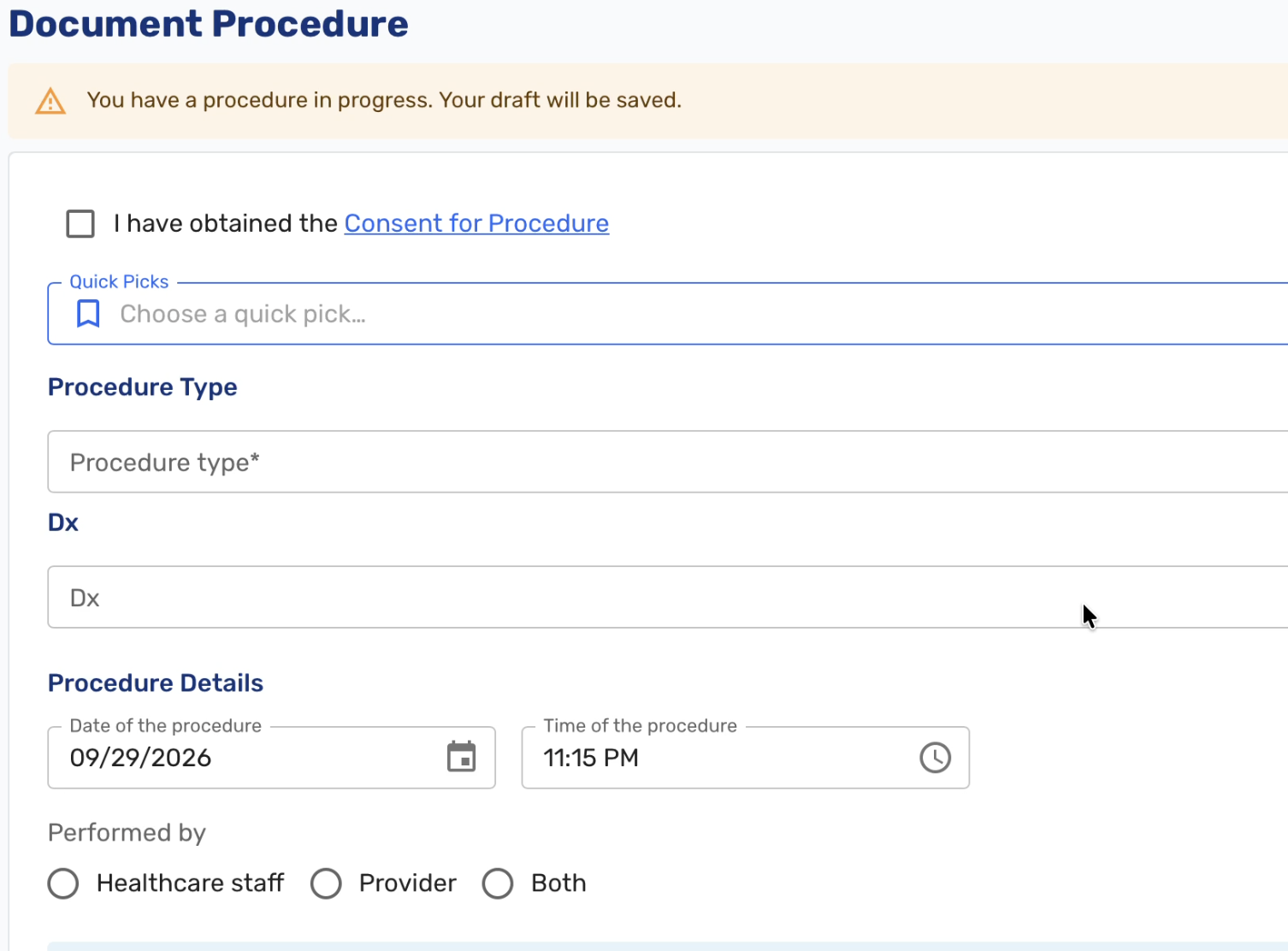
Previous procedure documentation UI 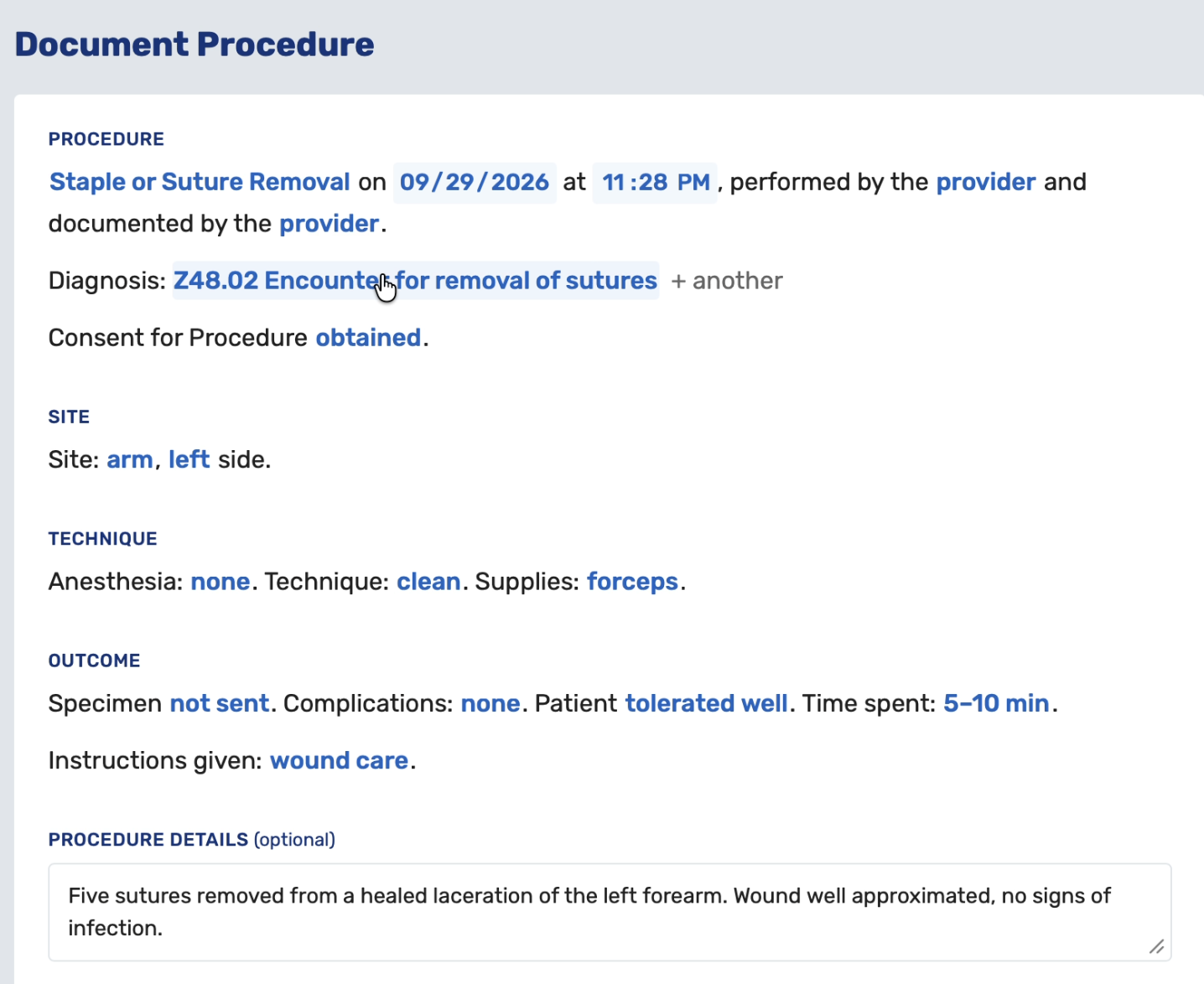
New procedure documentation UI Some things this is meant to improve.
- The entry reads the way a procedure note would. Previously a provider had to scroll the whole form and reconstruct mentally what had been documented. Now the finished entry can be read in a glance, in the order a note would describe it.
- The procedure documentation takes up less space so there is less scrolling and more content is visible at once, making it easier to verify everything is filled out.
- Items still missing are visible where you are working rather than offscreen. Blanks that are required, or that the CPT rules need in order to code the procedure, are marked as needed until they are filled. Previously the only way to find a gap was to scan the form or wait for a coding message.
- The CPT suggestions, code search and documentation guidance stay beside the sentences while you scroll, rather than sitting further down the page. This holds on a wide laptop screen with both the side menu and the scribe panel open. On narrower screens they move below.
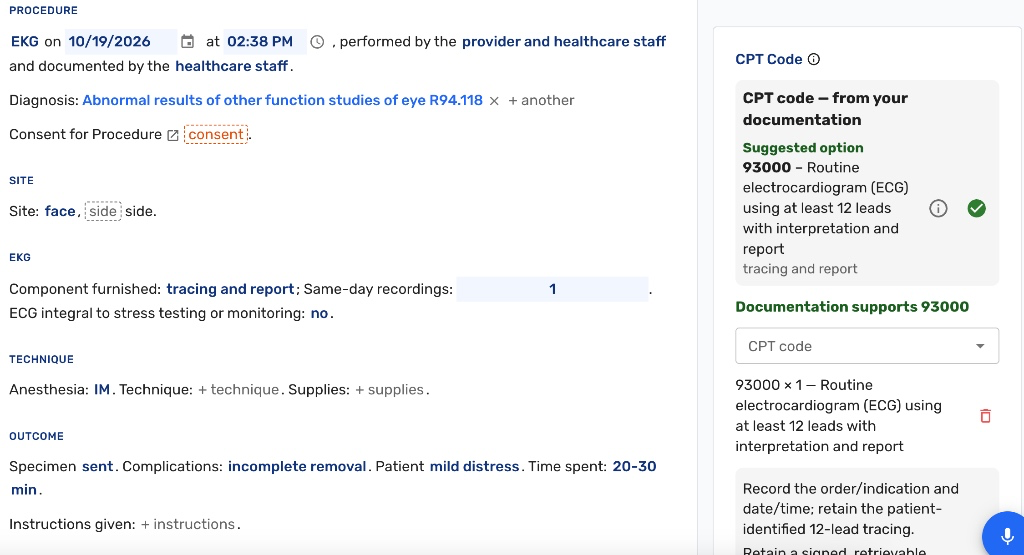
New procedure selection with CPT code guidance Multiple wounds each get their own sentence, added with a single link, so a two-wound repair reads as two lines rather than a repeated block of fields. Less common details such as irrigation sit behind a details link, and when a closure is adhesive only, the sutures and staples portion is not shown at all.
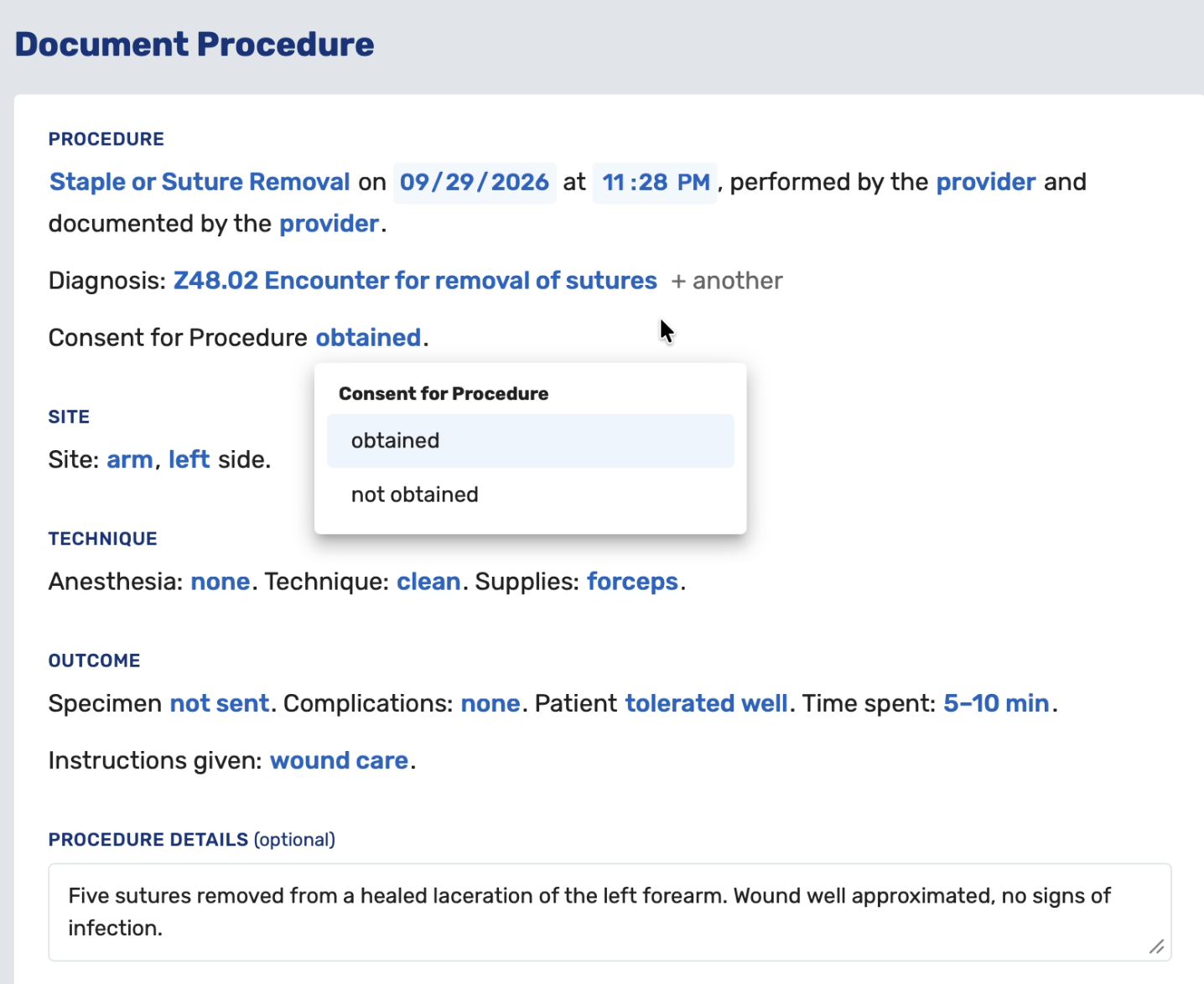
New procedure clickable selection UI As always, nothing is filled in automatically. Every value is entered by the provider exactly as it is today, and this is not AI-generated text or the scribe's note. The data saved is identical to what was saved before, only the presentation has changed. CPT coding rules are unchanged, so previously saved procedures, drafts and quick picks all open normally with their values in the sentences.
Suggested Preliminary Reads for X-rays
-
Preliminary x-ray reads are short and repetitive. Most are a negative read or one of a handful of common findings, and typing them out by hand is slow and produces wording that varies from provider to provider (#9835 (opens in a new tab)).
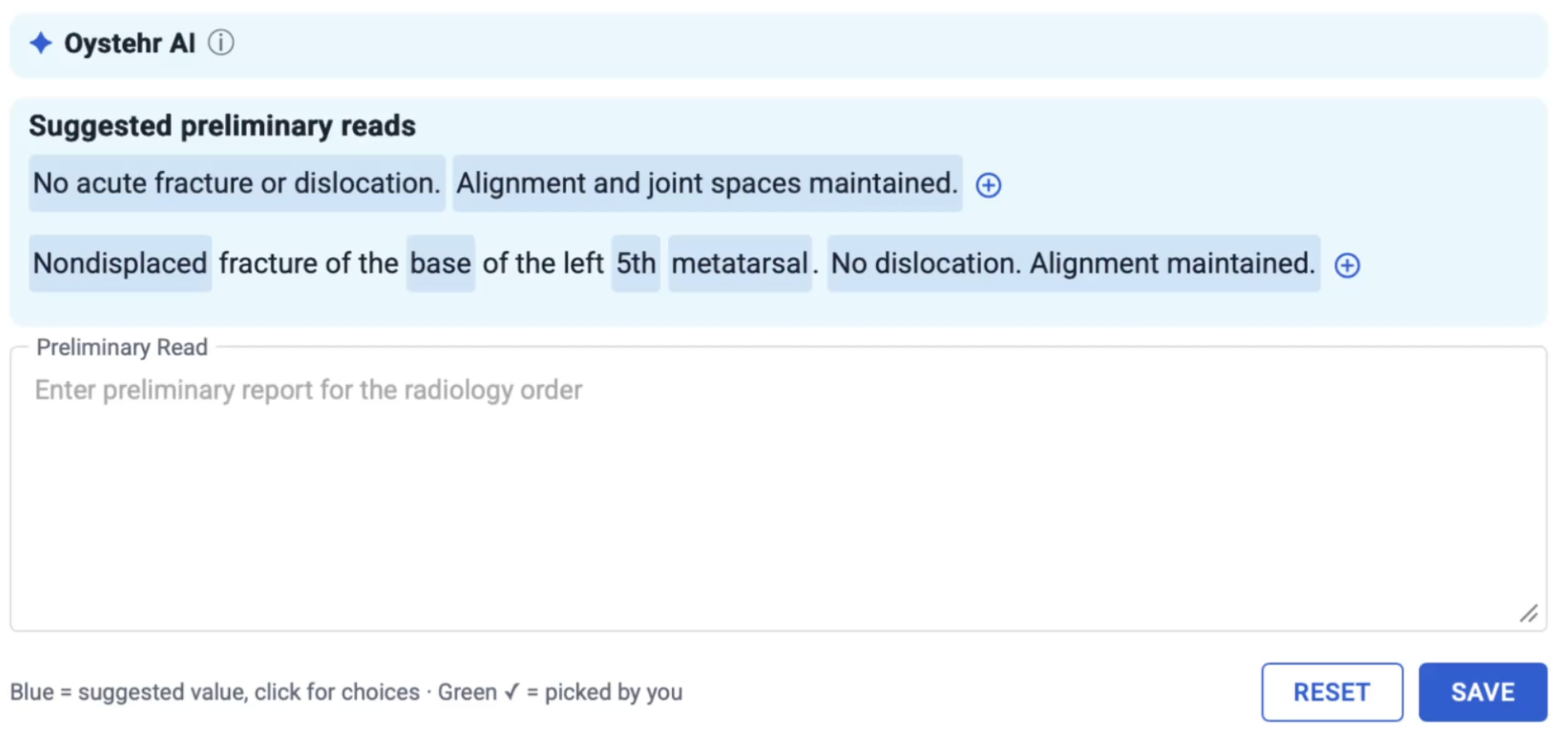
Ottehr x-ray documentation assistance On a performed x-ray order with no preliminary read yet, Ottehr now offers suggested read options for that study's body region, next to the Preliminary Read field. Each suggestion is a complete sentence with the variable parts, such as side, bone, fracture type and displacement, selectable from short lists. Each starts on the most common choice. Where the order specifies left or right, the suggestion uses that side already.
For patients under 18, the suggestions focus on common pediatric findings and offer growth plate options and pediatric fracture types such as buckle, greenstick and Salter-Harris. Adults do not see those choices.
A provider can add one suggestion or several, then edit the result freely, or ignore the suggestions entirely and type their own read as before. Saving and sending the read is unchanged, and only the final text is kept. Once a preliminary read is saved the suggestions no longer appear.
Two things to know:
- The suggestions are fixed sentences based on the selected study, not generated from the image or from clinical history, so the same study always offers the same options.
- A small number of studies are not mapped to a region yet, including soft tissue neck, mandible and SI joints; those simply show no suggestions.
Review of Systems
- Each section of the Review of Systems screen now has a free text box at the bottom, so a provider can add detail that the checkboxes do not capture. The text is saved with templates and appears on the progress note PDF (#9438 (opens in a new tab)).
Ad Hoc Reporting
- Choosing data sets before writing a request is no longer necessary. The step was removed, since it turned out not to improve the quality of the results (#9782 (opens in a new tab)).
- The data available to reports was substantially broadened. Reporting had been stumbling on gaps where a part of Ottehr simply was not represented, and this was a deliberate catch-up pass to bring the reportable data in line with what the product actually records today (#9780 (opens in a new tab)).
- A report now shows the underlying rows it was built from, in a table beneath the result, and that raw data can be downloaded as a CSV. Both exist so a report can be checked rather than taken on trust: a user can spot check a calculation, or pull the data into a spreadsheet and reproduce the number independently (#9774 (opens in a new tab), #9773 (opens in a new tab)).
- Radiology reporting gained the over-read data already held in Ottehr: whether and when a study went to an outside teleradiologist, who sent it, whether the final read came from teleradiology or was written in-house, and who wrote it. A pending final status was added. Reports drawing on radiology data, particularly saved reports, are also noticeably faster (#9938 (opens in a new tab)).
- Reports are now more careful about what they claim. Where a field only approximates what was asked for, the report says the requested data is unavailable rather than quietly substituting the near match, and a warning appears when every row in a column comes back as Unknown.
Progress Note Header
-
The header above the progress note was reorganized. Payment information moved from its own row onto a dollar icon beside the visit type and service. The icon turns red when payment information has not been set. This warns the provider that this information still needs to be gathered and documented before medical decisions are made.

Compacted payment information icon -
Intake and provider assignment moved onto a team icon, and both can now be edited in a popup by clicking it (#9737 (opens in a new tab)).

Compacted provider assignment icon Allergies now sit inline after the date of birth rather than in a separate column, wrapping onto a second line when there are many. Pronouns moved into the hover on the patient name. The reason for visit now carries the same alert styling used on the tracking board.
Tracking Board
-
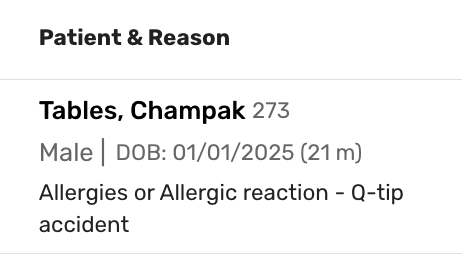
The friendly patient ID now appears beside the patient name. Some practices prefer not to say a patient's name out loud in a shared space and would rather refer to a patient by number (#9883 (opens in a new tab)).
Patient ID display in tracking board -
The location filter now has a Select All option, and each location carries its own checkbox so the current selection is clear at a glance (#9372 (opens in a new tab)).
In-House Medications and Immunizations
- An in-house medication or immunization order can now be deleted in any status, not only while pending. Previously an order administered to the wrong patient could only be marked not administered with a reason, which left an incorrect record in place. Cancelling an order now also clears its reason and given details rather than leaving them behind (#9616 (opens in a new tab)).
Vitals
-
Practices that enter vitals in imperial units can now choose, separately, which unit system the progress note header displays. Entry and display are configured independently in Admin (#9879 (opens in a new tab)).
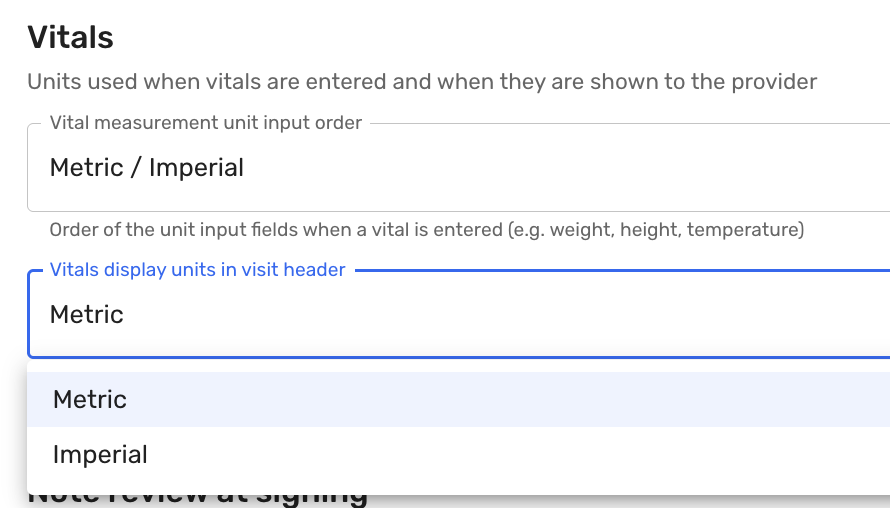
Vitals unit systems display configuration This exists because the two choices are often made for different reasons. Entry is frequently done by medical assistants who work in imperial, and entering in imperial reduces conversion errors, but some practices still want the header to read in metric. Others want imperial in both places.
Payments
- When staff remove a card on file for a patient who has more than one card saved, Ottehr now asks whether to remove only the default card or all of them. Previously removing a card on file removed the default and left any others in place without saying so (#9456 (opens in a new tab)).
Bug Fixes
- Fixed an issue where in-house lab orders did not appear on the single page progress note when that section was collapsed, though they showed when it was expanded (#9978 (opens in a new tab)).
- Fixed an issue where medication history failed to load for a patient who had not yet been synced to SureScripts, which is the case before any prescription or in-house medication order exists (#9847 (opens in a new tab)).
- Fixed an issue to prevent trailing spaces in a patient's last name that was preventing teleradiology from matching the patient (#9842 (opens in a new tab)).
- Fixed an issue where generating a second school or work note overwrote the first in the patient's documents instead of adding to it (#9892 (opens in a new tab)).
- Fixed an issue where changing a visit's service category, for example from Urgent Care to Occupational Medicine, could leave the encounter with no billing account attached (#9960 (opens in a new tab)).
- Numerous other bug fixes.