Changelog v1.46 - November 4, 2026
Summary
- Practices can now decide where each custom form's answers appear: Visit Details (as before), the Screening Questions page, or a new Clinical Forms page that tracks responses across visits, with both of the latter included in the note.
- Durable medical equipment (DME) now has its own ordering module, replacing the practice of ordering DME through the Procedures menu.
- A 12-lead EKG interpretation can now be documented with structured fields and suggested interpretations rather than typed as free text.
- Tasks can now have an attached running discussion, so staff can see what has already been done before picking one up.
- Free form encounters let staff record a patient communication without creating a visit or amending an old one.
- Custom forms can now carry scoring, so a screening instrument computes its own total from the patient's answers.
- Medical record requests can now be limited to a date range rather than always exporting the full record.
Practice Forms: Choosing Where Answers Appear
-
Until now, a custom form's answers only ever appeared on the visit's Visit Details page, and never in the progress note. That works for administrative forms, but clinical instruments such as a Vanderbilt ADHD scale, a PHQ-9 or a social history form belong in the chart, where a provider can see the answers alongside the patient's earlier responses, and where they become part of the note (#9946 (opens in a new tab)).
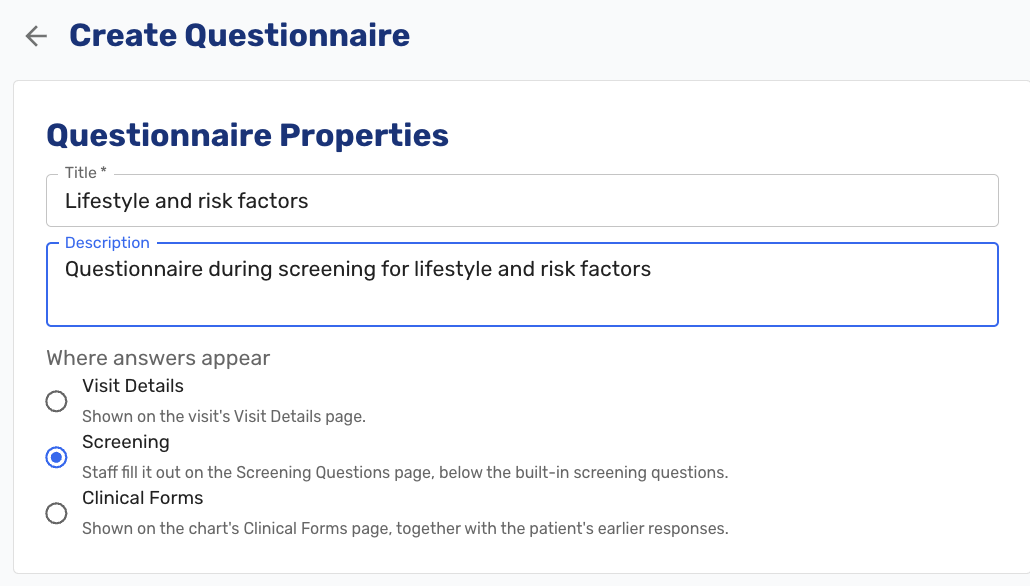
Questionnaire location configuration Each form now carries a setting choosing one of three placements. Visit Details is the default and behaves exactly as before. Screening puts the form's answers on the Screening Questions page, below the built-in questions, which are unchanged. Clinical Forms puts them on a new Clinical Forms page in the visit chart.
The Clinical Forms page shows the patient's responses from this visit and every earlier visit, grouped by form, with the most recently answered form first and earlier visits collapsed. This is what makes a repeated instrument useful: a provider can see today's score next to the last three.
Staff can add a form for the visit from any of the three pages, choosing the form and then either filling it out immediately or texting it to the patient.
Responses for the current visit can be edited or deleted while the visit is unlocked. Responses from earlier visits are view-only. Screening and Clinical Forms responses lock with the visit, because they are part of the note. Visit Details keeps its current behavior, where staff can still add and correct forms after the note is signed, since those forms sit outside the note.
On Review & Sign, this visit's Screening responses appear in the Screening questions section and its Clinical Forms responses in a new Clinical Forms section, both on screen and in the progress note PDF. Responses from earlier visits are never pulled into the current note.
Editing or deleting a form only affects responses collected afterward. Past responses keep the questions exactly as they were asked.
Durable Medical Equipment Orders
-
DME now has a dedicated ordering module. Until now, providers ordered and documented DME through the Procedures dropdown, which does not capture the elements a DME claim needs and left DME items cluttering a menu meant for something else (#8505 (opens in a new tab)).
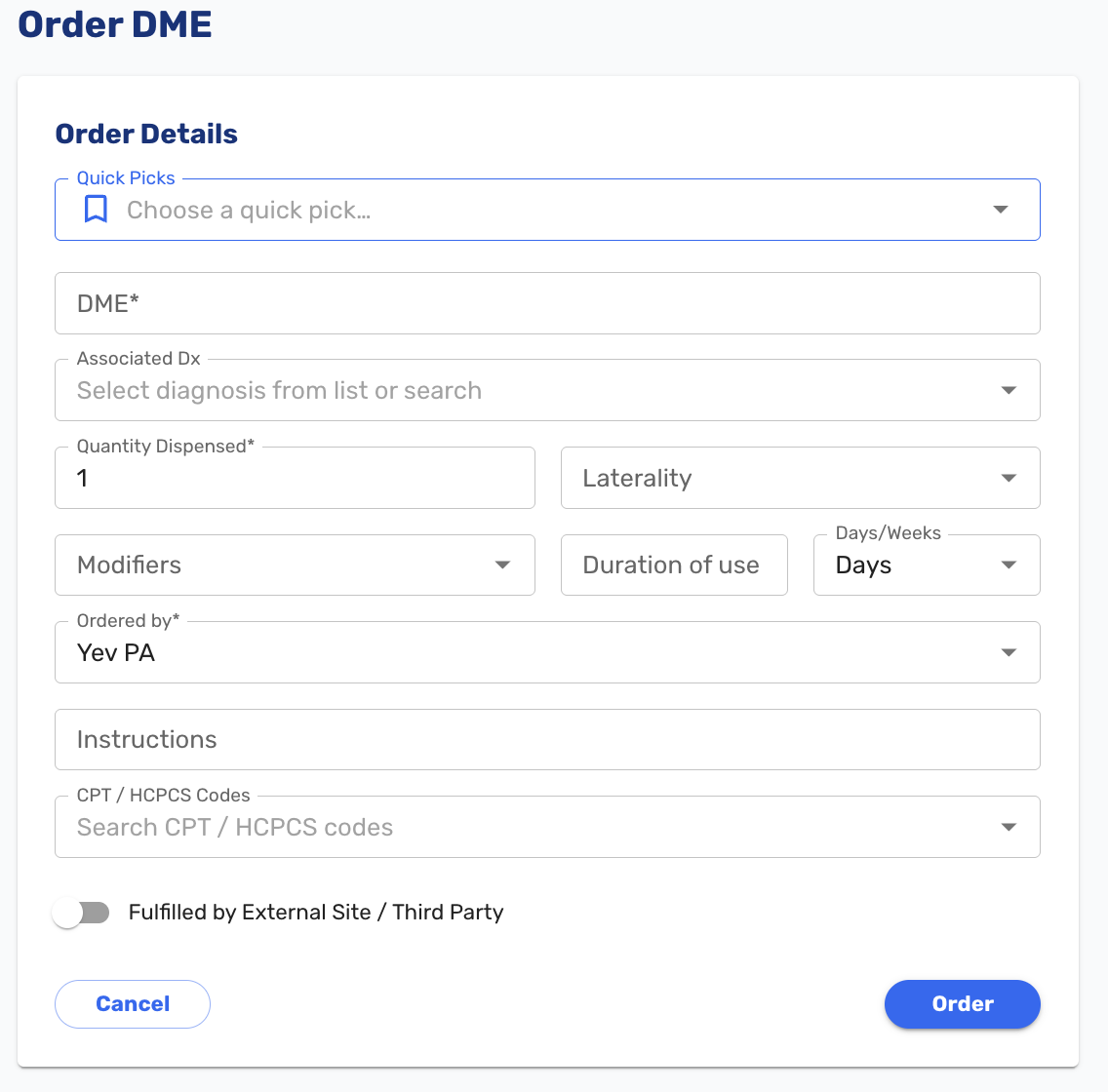
DME order modal DME appears on the chart sidebar between Procedures and Nursing Orders. The order form captures the item, the diagnosis auto-filled from the assessment and editable, quantity dispensed, CPT and HCPCS codes, laterality, modifiers covering new purchase, rental and used equipment, an estimated duration of use, the ordering provider and NPI, and free-text patient instructions. Orders are entered by hand, and quick picks can be set up for the items a practice dispenses regularly.
Two fulfillment paths are supported. For equipment dispensed from the practice's own inventory, the order moves to Pending on signing and appears on the tracking board. Staff generate the PDF when the item is ready, hand it to the patient, and mark the order Dispensed. Orders can be edited or deleted along the way. For equipment the patient will obtain elsewhere, the order is marked as externally fulfilled, prints as a prescription for the patient to take with them, and creates no task.
DME items were also removed from the Procedures dropdown, so the module is now the only place DME is ordered.
Structured EKG Interpretation
-
A 12-lead EKG interpretation was previously typed as free text in the procedure, written into the visit note, or handwritten on the paper strip and never entered at all. That made interpretations slow to record, inconsistent between providers, and frequently incomplete, which matters because payers require a documented interpretation for 93000 and 93010 (#9849 (opens in a new tab)).
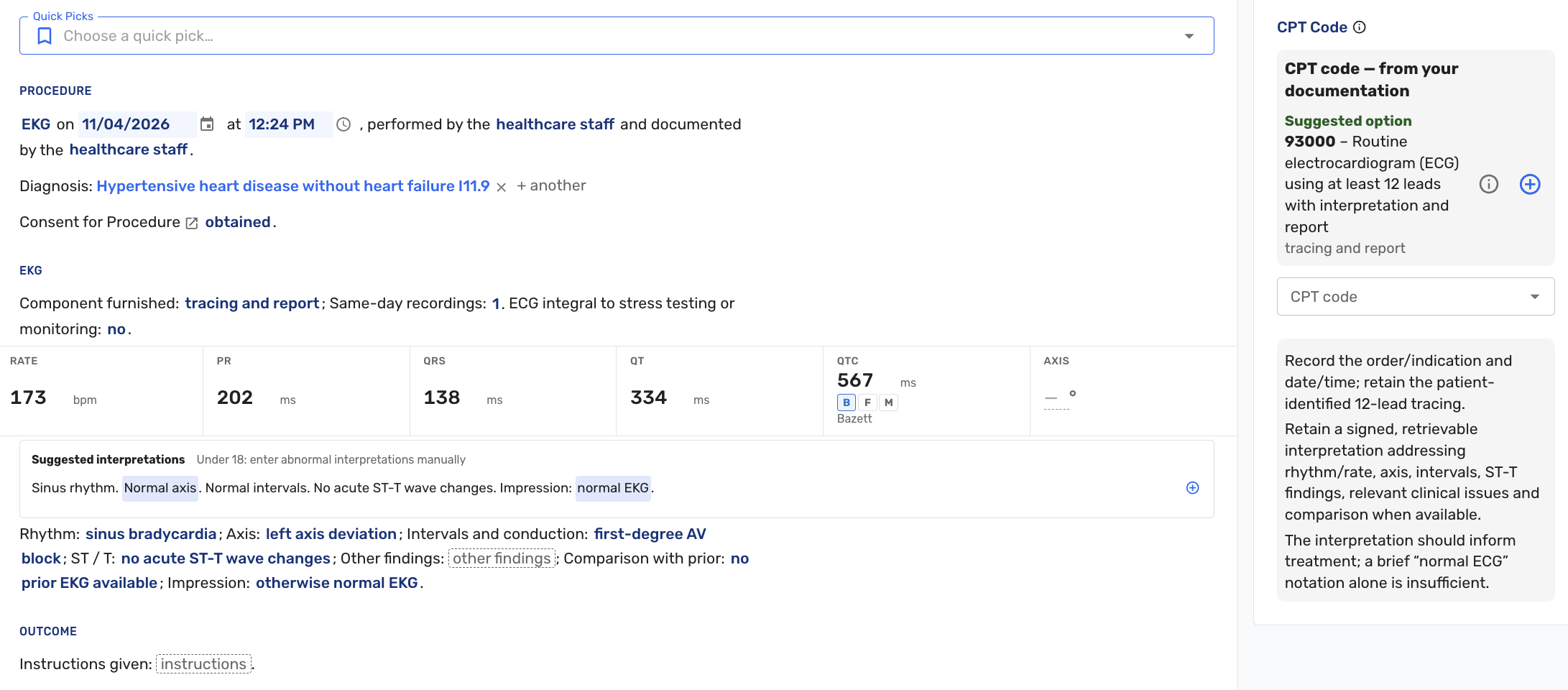
EKG procedure documentation The EKG procedure now has fields for rate, PR, QRS, QT, QTc and axis, taken from the printout. QTc is calculated from QT and rate using Bazett by default, and a provider can switch to Fridericia or type a value directly. Whichever was used is recorded with the result.
The interpretation itself is captured in structured fields covering rhythm, axis, intervals and conduction, ST and T wave findings, other findings, comparison with a prior EKG, and an overall impression.
Once rate and QT are entered, up to three complete suggested interpretations appear, ranked against the numbers, each showing why it was offered. A provider can adjust the variable words, accept one with a click, and then edit the result freely. Accepting a suggestion never overwrites a comparison already chosen. For patients under 18, only the normal interpretation is offered, since adult thresholds do not apply.
Where the chosen interpretation conflicts with the numbers entered, a reminder explains the conflict and offers a one-click correction. A PR over 200 ms with intervals marked normal is an example. Reminders never prevent saving.
The CPT guidance now suggests 93000 or 93010 only once rate, intervals, rhythm, axis, conduction, ST and T findings, comparison and impression are all documented, and otherwise lists what is still missing. 93005 is unchanged.
The note shows the measurements on one line followed by the interpretation, under the EKG procedure. Quick picks can include the interpretation fields, so a practice can save its own standard interpretations, and a starter "EKG, normal" quick pick is included for new environments. Fields that do not apply to a 12-lead EKG, such as body site, anesthesia and specimen sent, are no longer shown.
As with the suggested x-ray reads in v1.45, these are fixed sentence patterns chosen by the provider. Nothing reads the tracing and nothing is applied automatically.
Tasks
-
Staff can now keep a running discussion on any task. Until now there was nowhere to record what had been done, so questions, handoffs and status updates like "called the patient, waiting on a callback" happened out loud or in chat, and whoever picked the task up next could not see any of it (#7612 (opens in a new tab)).
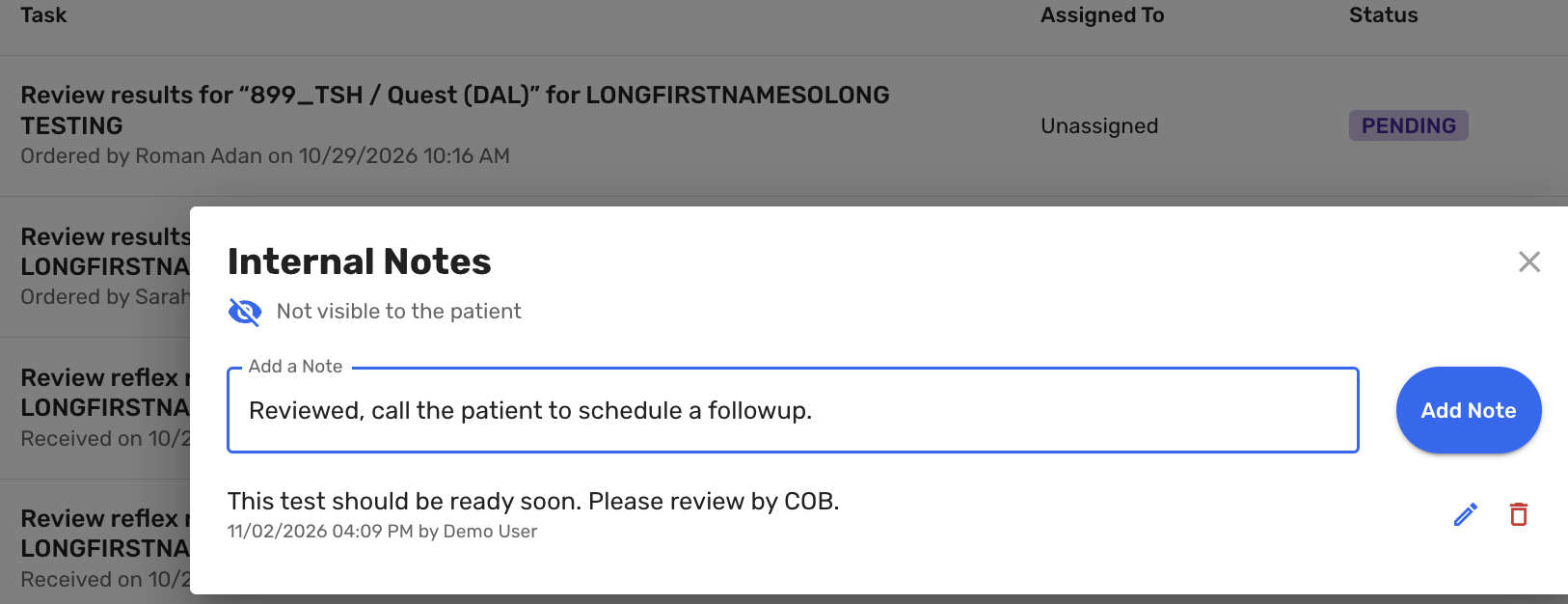
Task Notes A notes icon on each task opens its discussion. Any staff member can add a note, and notes can be added to a task after it has been completed. Each note records who wrote it and when. If someone other than the author edits a note, it keeps the original author and shows who edited it. Hovering over a task shows its notes without opening it.
Tasks with notes you have not read are marked on the Tasks board. The indicator only appears for people actually involved in the task, meaning its assignee, whoever created it, and anyone who has written on it. Your own notes never count as unread, and opening the task clears the indicator.
When someone adds a note, the others involved are notified within about five minutes, following each person's existing notification settings for that task category. The notification names the task but does not include what was written. People who follow a category only for new tasks are not notified about discussion on tasks they are not part of.
Task notes are internal and never visible to the patient. They are separate from the progress note, a visit's internal notes, and patient notes on the patient record.
-
Matching an inbound fax to a patient no longer completes its task. Filing the fax to the chart works as before, but the task stays in the queue until staff press Complete, since there is often more to do once a fax has been filed. A fax that has already been filed opens read-only from the queue (#10012 (opens in a new tab)).
Free Form Encounters
-
Staff can now record a patient communication that is not tied to a visit. Until now there was nowhere to document a phone call or similar contact without either creating a visit for it or attaching an addendum to an old one (#9720 (opens in a new tab)).
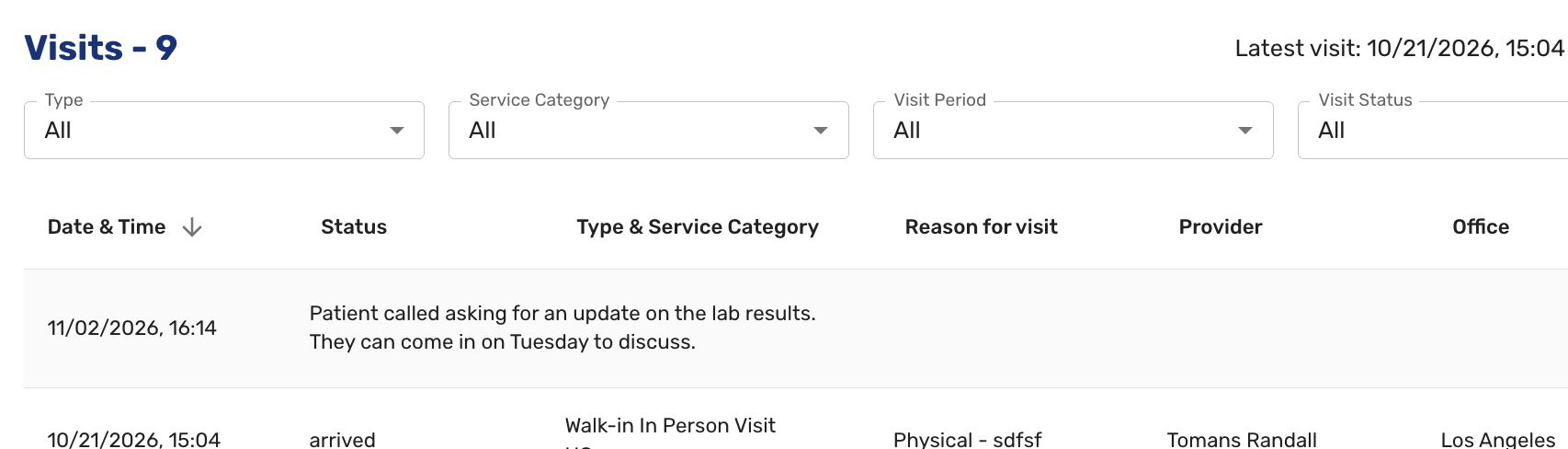
Free form encounters A 'Free Form' button on the right side of the patient's Visit History page adds a new row under the patient's visits where the note can be typed and edited directly. Free form entries can be deleted, and Free Form was added to the visit type filter on the patient record so they can be picked out from the rest of the history.
Scored Forms
-
Custom patient forms can now carry scoring. A form can hold hidden calculated items whose values are computed from the patient's answers when they submit, such as the total for a screening instrument, along with derived results like whether the screen is positive and the rationale for it (#8518 (opens in a new tab)).
Patients see no sign of any of this. Answer options show their normal text with no score values attached, and no running total appears.
Providers see the calculated results with the rest of the responses.
Scored forms are not built through the form builder. They are imported as a file rather than configured in the UI, and once imported they are read only and marked as such.
Medical Record Requests
-
Choosing Medical Record now asks for a date range before the record is produced, whether it is being downloaded as an archive or sent as a fax. The range opens with the patient's first visit and today's date already filled in, so the default remains the complete record, and staff narrow it only when a request calls for a particular period (#9757 (opens in a new tab)).
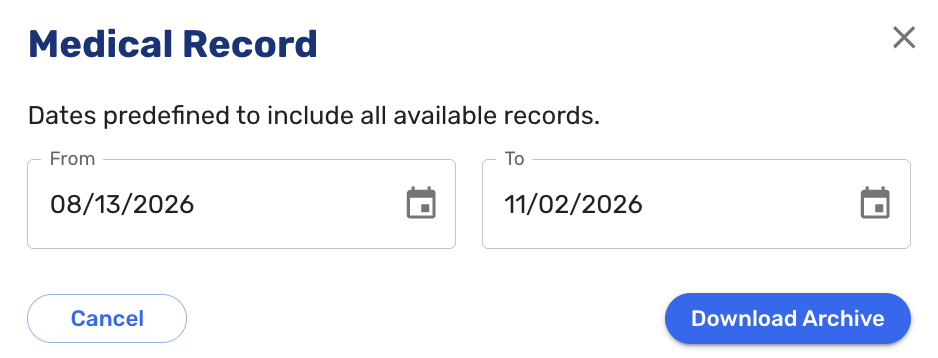
Medical Records Request date range selector
Adding a Visit in the Past
-
Staff can now book a prebook visit on a date that has already passed, through the Other Dates tab on the calendar. This exists for documenting care delivered while Ottehr was unavailable, such as during a power outage, where the practice has paper notes to enter afterward (#10101 (opens in a new tab)).
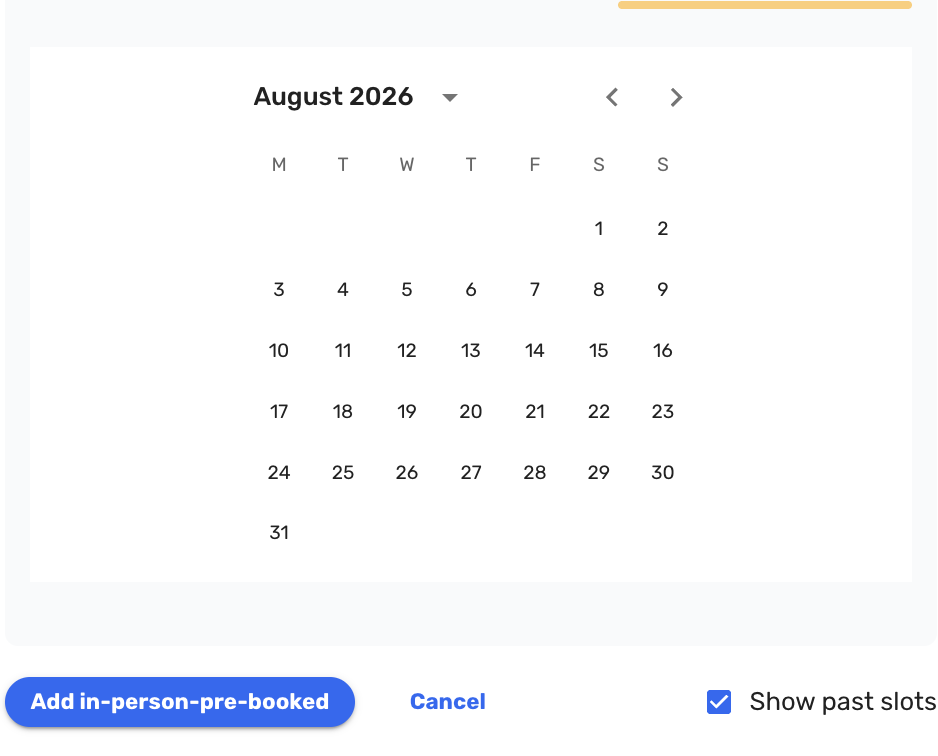
Adding past encounters Patients cannot book a past date themselves; the patient portal is unchanged.
One thing to be aware of in this first version: a backdated visit still triggers the normal confirmation messages to the patient. We expect to address that in a future release.
External Lab Orders
-
External lab orders are no longer marked STAT automatically. STAT is now a toggle set at ordering time. Labs had been calling the provider on every order to confirm whether it was genuinely urgent, because everything arrived flagged (#10015 (opens in a new tab)).
Global templates saved before this release carry no STAT flag; templates saved afterward record whatever was selected.
Radiology
-
The Send to Final Read step was replaced with two explicit buttons: Teleradiology Final Read and Internal Final Read. Previously there was a single button alongside a checkbox reading "Don't send to teleradiology. I will write the final report myself." Staff would tick the checkbox and then press the button anyway, since it was the only way forward, and the study went out to teleradiology at cost despite the practice intending to handle it in house (#10081 (opens in a new tab)).
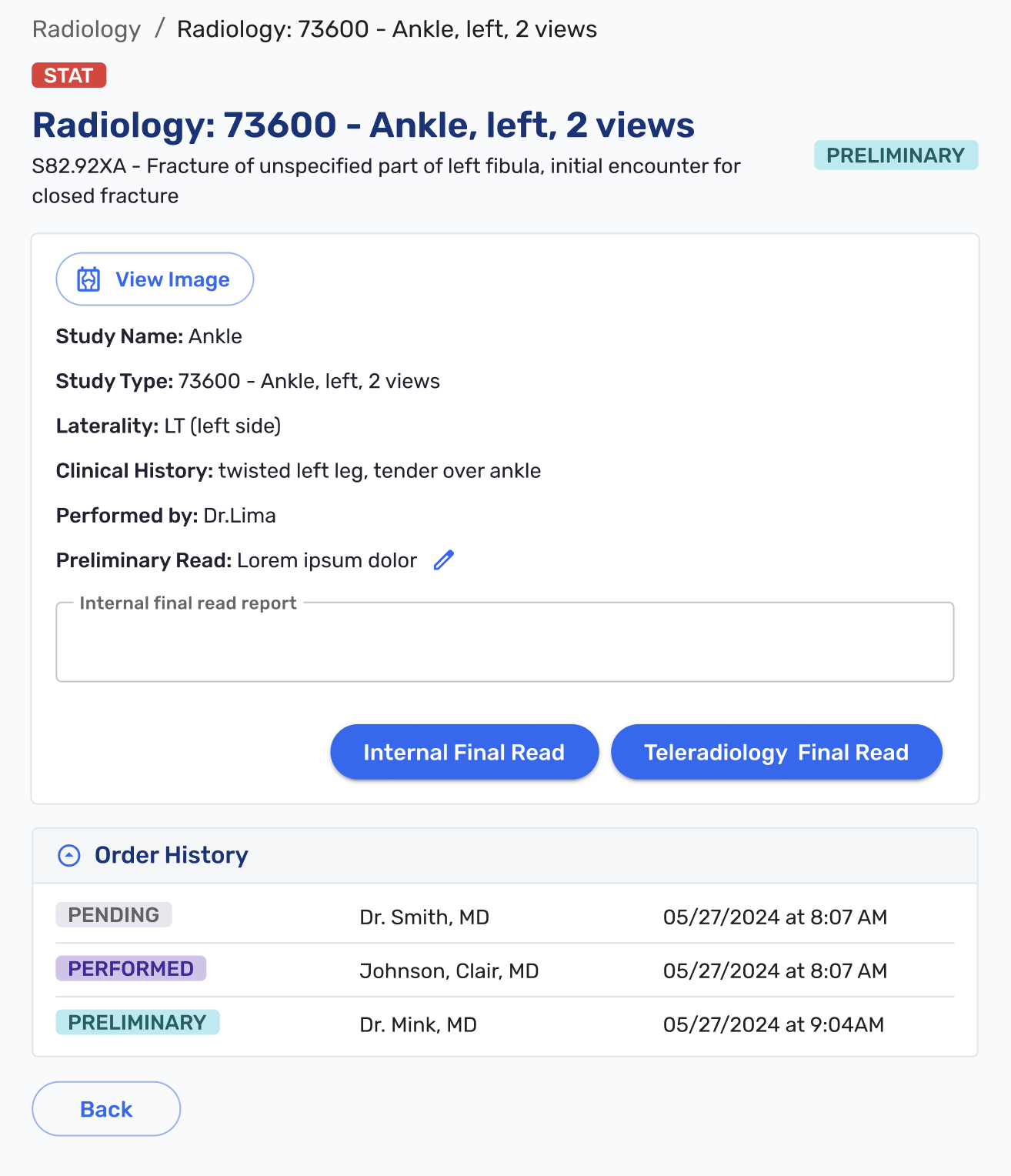
Radiology Internal Final Read button Each path now has its own button. Teleradiology Final Read sends the study out, as the old button did. Internal Final Read lets the provider write the final read and close out the order without it leaving the practice. Teleradiology Final Read is disabled once an internal final read has been started.
-
Radiology reports are now filed automatically into the Radiology Reports folder in patient documents (#8704 (opens in a new tab)).
Documents
- The Visit Documents section on the progress note and visit details was renamed All Documents and now shows every document on the patient's record rather than only those attached to the current visit. The Visit column added in v1.41 still identifies which documents belong to the visit being charted. This makes it possible to consult a document from an earlier visit without leaving the note (#9975 (opens in a new tab)).
- Documents can now be selected with checkboxes and downloaded together as a zip file, rather than one at a time (#9282 (opens in a new tab)).
Tracking Board
- Scheduled Follow-up was added to the visit type filter, so follow-ups can be shown or hidden as needed (#9619 (opens in a new tab)).
Patient Chatbot
- The intake chatbot now switches to Spanish when a patient begins writing in Spanish, and continues in Spanish for the rest of the conversation. Previously it understood Spanish but kept replying in English until explicitly asked to switch (#9691 (opens in a new tab)).
Medications and Immunizations
-
The immunization ordering screen now exposes the administration fields alongside the order details, matching how in-house medications already work. None of them are required at ordering, and a quick pick applied at either step now fills in the CPT code (#9300 (opens in a new tab)).
-
Medication history gained Last Filled and Refills columns. For prescriptions coming from the eRx system these populate automatically, and for manually entered scheduled medications staff can now record a prescription last filled date and a refill count (#9986 (opens in a new tab)).

Expanded Medication History Table
Vitals
- Selecting supplemental oxygen as the SpO2 qualifier now reveals two further fields: flow rate in liters per minute, and delivery type covering nasal cannula, non-rebreather mask, simple face mask, tracheostomy collar, Venturi mask, or other with free text. The values appear everywhere vitals are shown, including the progress note, the vitals screen, the visit note PDF and the discharge summary (#9569 (opens in a new tab)).
Review of Systems
-
The checkboxes moved to the left of their labels; the two were previously far enough apart to invite clicking the wrong one. The green select-all control was separated from the red one by a divider and renamed Denies all (#9742 (opens in a new tab)).
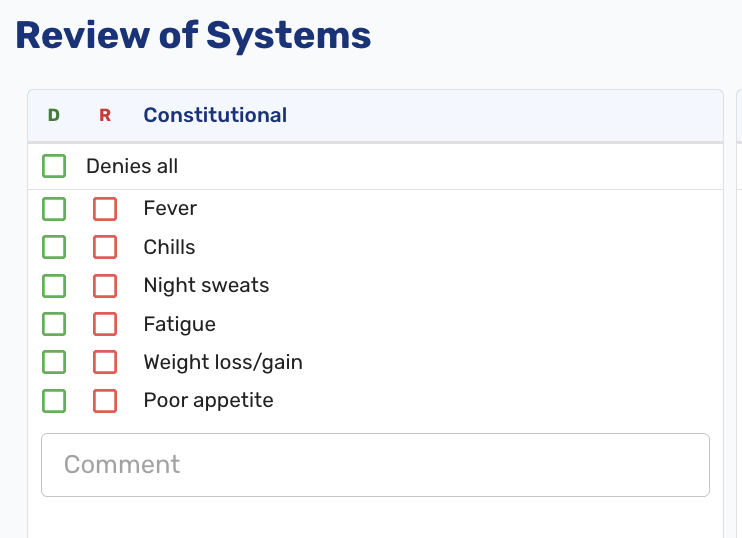
ROS UI improvement
Command Palette
- A command was added to assign yourself as the provider on the current chart, which makes it easier to take over a chart already assigned to someone else. It is available in every visit status (#9436 (opens in a new tab)).
Bug Fixes
- Fixed an issue where the insurance type on Visit Details did not update without refreshing the page, so a corrected value could be lost (#9872 (opens in a new tab)).
- Fixed an issue where patient outreach tasks were not created at all for practices configured with more than one payment processor account (#10043 (opens in a new tab)).
- Fixed an issue where insurance card images did not move with their insurance when primary and secondary were swapped, leaving each policy showing the other's cards (#10061 (opens in a new tab)).
- Fixed an issue where merging two patient records took the emergency contact from the wrong record, regardless of which was selected (#9709 (opens in a new tab)).
- Fixed an issue where a PCP fax number entered in the EHR was wiped out when the patient completed paperwork (#10259 (opens in a new tab)).
- Numerous other bug fixes.